Инструкция для Hyundai H-1410, Electronics H-1410
 1
 2
 3
 4
 5
 6
 7
 8
 9
 10
 11
 12
 13

2
Power supply
BATTERY OPERATION
·
Open the battery compartment cover.
·
Insert 6 batteries (UM-1). Please observe correct battery polarities or the set will not work.
·
Close the battery compartment cover.
AC OPERATION
·
Before the first connecting of the appliance check that voltage indicated on the rating label corresponds the mains voltage in your home.
·
Plug the corresponding end of cord into the AC socket on the rear of the set.
·
Insert the plug into power supply.
CAUTION:
·
When the set is only used with AC or is not used for 2 weeks or more, please remove the batteries, to avoid damage to the set from leakage of batteries.
·
Always switch off the unit when not in use.
·
Always unplug the appliance from power supply, when no use long time.
Stereo headphone connecting
·
For private listening, insert 3.5 mm headphone into the stereo headphone jack.
·
Adjust volume control to the appropriate level as desired.
·
When the stereo headphone jack is plugged, speaker will disconnect automatically.
Radio operation
·
Set Function switch to RADIO position.
·
Select your desired broadcasting band with Band switch.
·
Press NEXT/TUNE-UP button or NEXT/TUNE-UP button and then release the button when the fast scanning starts. The frequency will continue to
change and will automatically stop when a broadcast station is received.
·
To receive a weak broadcast signal press the NEXT/TUNE-UP or NEXT/TUNE-UP button by one press at a time and adjust the frequency you wish to
receive.
RADIO STATION MEMORY
·
12 broadcast stations of FM band, 6 AM and 6 LW stations can be stored to the preset memory.
·
During tuner mode, find a desired station.
·
Press MEM button to make the channel display appear.
Оглавление инструкции
- Страница 1 из 14
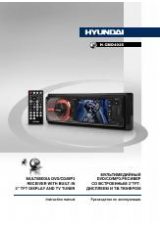
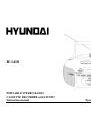
H-1410 PORTABLE STEREO RADIO CASSETTE RECORDER with CD/MP3 Instruction manual CD/MP3
- Страница 2 из 14
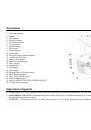
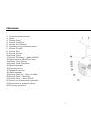
Description 1. Telescopic antenna 2. Handle 3. Pause button 4. Stop/Eject button 5. Fast forward button 6. CD door cover 7. Rewind button 8. Play button 9. Record button 10. Open button 11. Play/Pause, band (AM/FM) button 12. SBASS On/Off switch 13. Next/Tune up button 14. Back/Tune down button 15.
- Страница 3 из 14
Power supply BATTERY OPERATION · · · Open the battery compartment cover. Insert 6 batteries (UM-1). Please observe correct battery polarities or the set will not work. Close the battery compartment cover. AC OPERATION · Before the first connecting of the appliance check that voltage indicated on
- Страница 4 из 14
· · · Press NEXT/TUNE-UP button or BACK/TUNE-DOWN button to choose the desired channel. Press MEM button again, then the desired station is stored in channel. The display shows the channel of the desired station. Repeat steps for storing various stations to other channels. ANTENNA · · For FM
- Страница 5 из 14
SKIP AND SEARCH MODE · · Press the NEXT button once to skip to next track. Keep pressing to search for a particular at high speed forward. Release the button to resume normal play. Press the BACK button once to skip back to previous track. Keep pressing to search for a particular point at high
- Страница 6 из 14
· · Insert a blank cassette into cassette compartment. Press the PLAY button and RECORD button on deck simultaneously to start recording. RECORDING FROM CD · · · · · · · Set Function switch to CD position. Insert your cassette tape in the cassette compartment. Activate the CD player. Press RECORD
- Страница 7 из 14
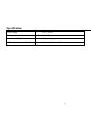
Specification Power supply 220 V, 50 Hz Power output 2.2 Net / Gross Weight 2.5 kg / 2.8 kg Gift box dimension (L x W x H) 315 mm x 260 mm x 175 mm 2W 6
- Страница 8 из 14
1. 2. 3. 4. 5. 6. 7. 8. 9. 10. 11. 12. 13. 14. 15. 16. 17. 18. 19. 20. 21. 22. 23. 24. Pause Stop/Eject Fast Forward Rewind Play Record Open Play/Pause , Band (AM/FM) SBASS ./ . Next/Tune-up Back/Tune-down Mem Up , Skip +10/Folder Mem , Rep/Prog Stop , Stereo On/Off 7
- Страница 9 из 14
· : . . · · : . , . : . . · · · . 6 UM-1, , . . · , , , · · · . . . : , , , . . · , . · · · · · 3,5 . . RADIO. BAND . .
- Страница 10 из 14
· NEXT/TUNE-UP . · NEXT/TUNE-DOWN , . NEXT/TUNE-UP NEXT/TUNE-DOWN, . · · · · · · 12 , 6 AM 6 LW . . MEM, NEXT/TUNE-UP MEM , . BACK/TUNE-DOWN . . . . · · FM FM FM , A , . , . FM · FM. : · (FM). FM ST, , FM STEREO. · · · · · Record Play Fast-forward Rewind Stop/Eject - · Pause - · · · . STOP/EJECT.
- Страница 11 из 14
· · · : PAUSE. STOP/EJECT. . . CD · · · · · · · · · · Open Program Next Back Play/Pause Repeat Stop c CD. , Open . , , , · . . PLAY/PAUSE, PLAY. . PLAY · , PLAY/PAUSE, STOP. · , NEXT NEXT. , , . NEXT . · BACK. , BACK. BACK. · , REPEAT, REPEAT. · , REPEAT REPEAT . 10 ,
- Страница 12 из 14
· , REPEAT REPEAT , . · , . 20 · · · · · 20 NEXT PROGRAM, BACK , PROGRAM , . , . . . , . PLAY/PAUSE. , : , . · STOP, OPEN, . · CD TAPE. , MP3 · · · . MP3- MP3- CD (MP3). , , : · · . CD- . . RADIO. . , . . RECORD PLAY. CD · · , 3 · · STOP. CD. . 11 CD
- Страница 13 из 14
· · · · · CD , , PLAY RECORD PAUSE. STOP/EJECT, , . . PAUSE , . STOP. . . · . , , . · · · . , , , . . . . · · · . , . , , · , . , . , , . 220 , 50 2,2 2 / 2,5 ( x , x ) 315 / 2,8 x 260 x 175 12 .
- Страница 14 из 14