Инструкция для Hyundai H-1405
 1
 2
 3
 4
 5
 6
 7
 8
 9
 10
 11
 12
 13
 14
 15
 16

5
·
Press the STOP/EJECT button to stop the playing, press the button again to open the cassette door and you can take out the tape.
·
When the tape plays to the end, playing will be stopped automatically.
Cassette tape recording
·
Open the cassette door by pressing the "STOP/EJECT" cassette Button.
·
Insert a blank cassette with the tape-side up, into the proper Guide-rails on the inside of the cassette door.
·
Gently push the cassette door forward (inwards) to close it.
·
Make sure the tape is fully and properly inserted before doing so.
·
The set is now ready to start recording, which can be done from either the radio or CD-player.
Recording from radio
·
Set the FUNCTION switch to RADIO position.
·
Tune to the desired station by pressing the NEXT/TUNE UP or BACK/TUNE DOWN button.
·
Press the PLAY button and RECORD button on deck simultaneously to start recording.
Recording from CD
·
Set FUNCTION switch to CD position.
·
Press RECORD and PLAY buttons simultaneously to start recording.
·
Press the PAUSE button.
·
Start the CD-player and select the exact song to be recorded.
·
Release the PAUSE button to start recording.
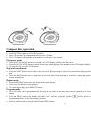
Insertion & removal of discs
·
When opening the CD-door, always ensure the disc is not in motion (not spinning) when you open the CD-door. Always press "STOP" button to stop
the disc spinning first.
·
Place a CD into the compartment with the label-side (printed side of disc) facing upwards. Press down in the center part of disc until the disc "locks"
onto the center spindle.
·
When the CD has been placed onto the center spindle, gently lower the CD-door downwards until it locks shut.
·
The CD is now ready to be played.
·
To remove a disc, follow the same procedure as described above, except to remove the CD instead of inserting it into the compartment, by placing
one finger at the middle of disc (center spindle) & the other at the edge of the disc & gently pulling upwards.
·
Important : always hold a CD by its edges. Avoid getting any finger prints, smudges or dirt onto the surface of a disc. In case this happens, use a
special CD-cleaning cloth or cleaning kit to remove the dirt or smudges.
Important:
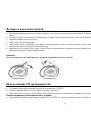
Please make sure to always fold down the handle before opening the CD door.
Оглавление инструкции
- Страница 1 из 17
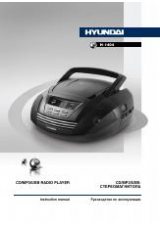
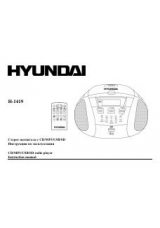
H-1405 PORTABLE STEREO RADIO CASSETTE RECORDER with CD/MP3 Instruction manual CD/MP3
- Страница 2 из 17
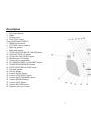
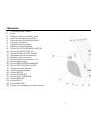
Description 1. Telescopic antenna 2. Handle 3. CD door cover 4. FUNCTION switch (Tape (Off)/Radio/CD(MP3)) 5. DBBS On/Off switch 6. VOLUME control regulator 7. Right top speaker 8. Right main speaker 9. CD PLAY/PAUSE/BAND (AM/FM) button 10. CD NEXT/TUNE UP button 11. CD BACK/TUNE DOWN button 12.
- Страница 3 из 17
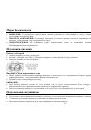
Important safeguards · · · ATTENTION: The owner s manual contains important operating and maintenance instructions. For your safety, it is necessary to refer to the manual. DANGEROUS VOLTAGE: Uninsulated dangerous voltage that may be of sufficient magnitude to constitute a risk of electrical shock
- Страница 4 из 17
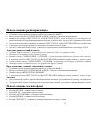
Radio operation · · · · · · Set FUNCTION switch to RADIO position. Select your desired broadcasting band by pressing the PLAY/PAUSE/BAND (AM/FM) button. Press NEXT/TUNE UP or BACK/TUNE DOWN buttons and then release the buttons when the fast scanning starts. The frequency will continue to change and
- Страница 5 из 17
· · Press the STOP/EJECT button to stop the playing, press the button again to open the cassette door and you can take out the tape. When the tape plays to the end, playing will be stopped automatically. Cassette tape recording · · · · · Open the cassette door by pressing the "STOP/EJECT" cassette
- Страница 6 из 17
Compact disc operation · · · Set FUNCTION switch to CD (MP3) position. Put a CD into the CD compartment and close the CD door. The LCD display will show the total number of track after a few second. Play/pause mode · · · Press the PLAY/PAUSE button to start play, the LCD display will show the first
- Страница 7 из 17
· Press the PROG button to confirm. · Repeat steps described above to enter additional memories into the program if necessary. · When all the desired tracks have been programmed, press PLAY button to play the disc in the order you have programmed. · To stop the CD, press the STOP button. NOTE: The
- Страница 8 из 17
Erase protection · · · To prevent accidental erasing of a cassette, simply break off the two plastic tabs located on the cassette tape s rear side. When a cassette with removed plastic tabs is inserted, the recording button cannot be pressed. If a cassette is to be erased and re-recorded at a later
- Страница 9 из 17
1. 2. 3. 4. 5. 6. 7. 8. 9. 10. 11. 12. 13. 14. 10 15. 16. 17. 18. 19. 20. 21. 22. 23. 24. 25. Dynamic Bass Boost PLAY/PAUSE/BAND (AM/FM) CD NEXT/TUNE UP CD BACK/TUNE DOWN «+10» REPEAT/PROG/MEMORY STOP/STEREO ON/OFF PAUSE STOP/EJECT FAST FORWARD REWIND PLAY RECORD ( ) 9
- Страница 10 из 17
· : . . · · : . , . : . . · · · . 6 UM-2, , · , , · · . . , . . : , , , . . · , . · · · 3,5 . . 10 ( ).
- Страница 11 из 17
· · · RADIO. PLAY/PAUSE/BAND (AM/FM), NEXT/TUNE UP BACK/TUNE DOWN, . · · · . , , 12 . TAPE. (6 FM 6 . " MEM.UP/SKIP +10/FOLDER " NEXT/TUNE UP BACK/TUNE DOWN " MEM.UP/SKIP +10/FOLDER ", , , AM). ( "mem"). ). . . , · · · · · · · · · . , BACK/TUNE DOWN . NEXT/TUNE UP · · · · · · · · . RADIO.
- Страница 12 из 17
· PAUSE - · · · · · . , . : · · · · · · · · · PAUSE. STOP/EJECT. . . STOP, REWIND , FAST FORWARD . STOP/EJECT. . . , . CD · · NEXT/TUNE UP · · · · · · STOP/EJECT. . PLAY. . RADIO. PLAY/PAUSE/BAND (AM/FM) BACK/TUNE DOWN RECORD PLAY. . . CD CD. PLAY RECORD . PAUSE. , PAUSE. , . 12
- Страница 13 из 17
· , . STOP . · · · · . , . . . , : , , . · : , . , . : . CD · · · · , , CD (MP3). . , PLAY/PAUSE, . . 13
- Страница 14 из 17
· PLAY/PAUSE, . · , STOP. · , CD NEXT CD NEXT. , . CD NEXT . · CD BACK. , CD BACK. · CD BACK. , · REPEAT. , · , · REPEAT . REPEAT. , . 20 · 20 PROG, « 01» . , . STOP. , . · · · · · CD BACK AND NEXT , . PROG , . PLAY/PAUSE. , , . STOP. : · · , , . , CD . TAPE. , 14 -
- Страница 15 из 17
MP3 · · · . CD (MP3). , MP3- , , . . . . · · · · CD BACK AND NEXT MP3 . . MP3 MP3 , "skip +10/folder", "skip +10/folder" , : 10 . 3 . . ON ( .). Dynamic Bass Boost · · , «Dynamic Bass Boost» · . , , . · · . , , , . · . . · · · . . , . , , , . 15 , .
- Страница 16 из 17
· , . , , . 220 RMS 4 / 3,0 ( x x ) 408 , 50 2 / 3,25 x 270 x 204 16 .
- Страница 17 из 17