Инструкция для Hyundai H-1404, Electronics H-1404
 1
 2
 3
 4
 5
 6
 7
 8
 9
 10
 11
 12
 13
 14
 15
 16
 17
 18
 19
 20
8
Song/file direct key in
Using Keypad on Remote Control - key in your desired number and press Play button to listen the song.
Repeat playback
Use the Repeat button to listen to an entire disc, one track, or a programmed sequence repetitively.
Press the Repeat button. The Repeat indicator changes with each press of the button as follows:
Repeat Repeat folder or Album (only for MP3 CD-ROM with multiple Albums) Repeat all blank display.
Manual search within song
During playback, by pressing and holding the MP3 FF button will cause the player to scan through the current track faster. At the end of a track the player
will skip to the next track and continue scanning, depend on disc recording, some disc can't play.
Clock function
To set clock press and hold on "Clock Set" button, and press the "Hour" and "Min" button to set the time you want.
Alarm setting
To set alarm, press and hold "Alarm Set" button, and press the "Hour" and "Min" button to set the
alarm time you want.
Alarm ON/OFF
Set alarm ON, press "Alarm ON / OFF" once. The alarm is on and alarm symbol (( ( ))) will show on LCD display. If you switch off the alarm function,
just press the "Alarm ON / OFF" button one more time.
To Turn Off the Alarm Buzzer
Anytime, if alarm buzzer is on, just press "Alarm ON / OFF" once, the alarm buzzer will switch off.
The clock and alarm setting will not be functional on Radio mode.
Оглавление инструкции
- Страница 1 из 21
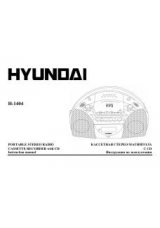
H-1404 PORTABLE STEREO RADIO CASSETTE RECORDER with CD Instruction manual CD
- Страница 2 из 21
Contents Description ..............................................................................................................................................................................................................................3 Important safeguards
- Страница 3 из 21
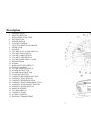
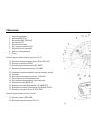
Description 1. 2. 3. 4. 5. 6. 7. 8. 9. 10. 11. 12. 13. 14. 15. 16. 17. 18. 19. 20. 21. 22. 23. 24. 25. 26. 27. 28. 29. 30. 31. 32. 33. SPEAKER GRILL MINUTES BUTTON RADIO DISPLAY BUTTON HOUR BUTTON POWER SWITCH VOLUME CONTROL FUNCTION SELECTION SWITCH PHONE JACK HANDLE CD / MP3 PLAY / PAUSE SWITCH
- Страница 4 из 21
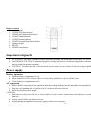
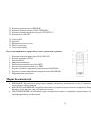
Remote control: 1. Infrared signal 2. CD/MP3 Play/Pause button 3. CD/MP3 back Skip-Search button 4. CD/MP3 Random button 5. CD/MP3 Program button 6. CD/MP3 forward Skip-Search button 7. Number keypad 8. MP3 FF 9. CD/MP3 Stop button Important safeguards · · · ATTENTION: The owner s manual contains
- Страница 5 из 21
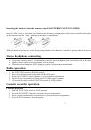
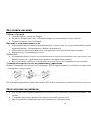
Inserting the batteries into the remote control (BATTERIES NOT INCLUDED) Insert 2 UM-4 (AAA or equivalent) size batteries into the battery compartment of the remote controller and replace the cover. Match the polarity (+ and ) on the batteries with the + and markings in the battery compartment.
- Страница 6 из 21
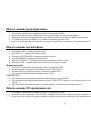
NOTE: · Press the PAUSE button to pause the playing. · Press the STOP/EJECT button to stop the playing, press the button again to open the cassette door and you can take out the tape. · When the tape plays to the end, playing will be stopped automatically. Compact disc operation 1. Set FUNCTION
- Страница 7 из 21
10. To cancel your memorised program, press the Stop Button and the Open Button to open the CD lid. Repeat mode · · · Press the REPEAT button once for single track repeat playing. Press twice for all track repeat playing. To cancel repeat play, press REPEAT button. To repeat a programmed selection
- Страница 8 из 21
Song/file direct key in Using Keypad on Remote Control - key in your desired number and press Play button to listen the song. Repeat playback Use the Repeat button to listen to an entire disc, one track, or a programmed sequence repetitively. Press the Repeat button. The Repeat indicator changes
- Страница 9 из 21
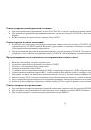
Recording Within Recording, no volume adjustment is necessary, recording level is automatically set. Recording from radio 1. 2. 3. 4. 5. 6. Set the FUNCTION switch to RADIO position. Tune to the desired station by turning the TUNING control regulator. Insert a blank cassette into cassette
- Страница 10 из 21
UltraBASS Reflex system For increased bass at all volume levels, press the BASS BOOST button to boost the low frequency tone for an emphasized bass sound. Maintenance and care · · · · Check your batteries regularly, old or discharged batteries should be replaced. If the unit is not going to be used
- Страница 11 из 21
..............................................................................................................................................................................................................................12
- Страница 12 из 21
1. 2. 3. 4. 5. 6. 7. 8. 9. MINUTES RADIO DISPLAY HOUR (10-13): 10. 11. 12. 13. 14. 15. 16. 17. 18. 19. 20. 21. 22. (PLAY/PAUSE) (STOP) (B. SKIP) (F. SKIP) (X-BASS) (REPEAT) (ALARM SET) (ALARM ON/OFF) (CLOCK SET) 32 (23-28): 23. 24. (RECORD) (PLAY) 33 12
- Страница 13 из 21
25. 26. 27. 28. (REWIND) (FAST FORWARD) (STOP/EJECT) (PAUSE) 29. 30. 31. 32. 33. ( 1. 2. 3. 4. 5. 6. 7. 8. 9. ): (PLAY/PAUSE) (STOP) MP3 FF (B. SKIP) (F. SKIP) (RANDOM) (PROGRAM) · : . . · : . , · . : . . 13
- Страница 14 из 21
· · · . 8 UM-1, , . . · , , · · , . . . : · , , , . . · , . 2 . + . , . · . 3,5 ). · · . . 14 (
- Страница 15 из 21
1. 2. 3. 4. 5. RADIO. , . , . . , · · · · · · TAPE. RECORD PLAY FAST FORWARD REWIND STOP/EJECT PAUSE - 1. 2. 3. 4. . STOP/EJECT. . PLAY. : · · PAUSE. STOP/EJECT. . · . CD 1. 2. 3. CD/MP3. . , , , 15 . .
- Страница 16 из 21
· · PLAY/PAUSE, . PLAY/PAUSE, . · , STOP. · , CD NEXT CD NEXT. , , CD NEXT . . · CD BACK. , 1. 2. 3. 4. 5. 6. 7. 8. 9. 10. · · · CD BACK. CD BACK. . CD/MP3. , . PROG. (B. SKIP) PROG., (F. SKIP) . . . PLAY . . . . , STOP . , , , REPEAT REPEAT. 16 REPEAT. .
- Страница 17 из 21
1. 2. 3. PLAY . REPEAT , . STOP , REPEAT. 4. 5. REPEAT . , STOP REPEAT. CD TAPE. MP3 1. 2. . . MP3 ( 15) : 3. 4. 5. PLAY/PAUSE. . , . : MP3 · · · . : (B. SKIP) (F. SKIP) (B. SKIP) ( (F. SKIP)) PLAY ( . 17 ) 165 ,
- Страница 18 из 21
REPEAT. : MP3 FF. . . , CLOCK SET, , ALARM SET, HOUR MINUTES HOUR MINUTES . , ALARM ON/OFF. ALARM ON/OFF. ALARM ON/OFF. : . 18 (( )). .
- Страница 19 из 21
, 1. 2. 3. 4. 5. 6. 7. . RADIO. . , . . PAUSE. RECORD. PAUSE 1. 2. 3. 4. 5. 6. 7. 8. . CD/MP3. . , , . PAUSE. RECORD. PAUSE , STOP/EJECT. . PAUSE. , PAUSE . STOP . 1. 2. 3. 4. 5. TAPE. . . RECORD. , STOP/EJECT. , 19 .
- Страница 20 из 21
UltraBASS Reflex , «BASS BOOST». · . . , , . · · . , , , . · . . · · · · · · . . , . , , , , . , , / ( x , . x ) . 220 , 50 2 2,5 3,0 / 3,3 352 x 205 x 184 20 .
- Страница 21 из 21