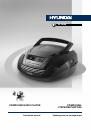
Инструкция для Hyundai H-1404
 1
 2
 3
 4
 5
 6
 7
 8
 9
 10
 11
5
Instruction manual
• This unit does not support USB-MP3
player, due to their inherent lack of software
compatibility. Only USB “pen drives” (flash
memory USB drives) can be used, for MP3
playback.
• Please do not use a USB extension cable
to connect your USB drive to the USB socket
of this unit. Such cables can pick up additional
interference, which can corrupt the data flow,
preventing normal operation and usage of the
USB socket. Always connect your USB drive
directly to the USB port.
Repeat playback
At any time during playback, press PROG/
REPEAT button once to repeat the current
track. Press the button twice to repeat all
tracks on the CD. To cancel repeat playback,
press this button once again.
Program mode
• The CD player can be programmed to play
any sequence of up to 21 tracks for audio-CD/99
tracks for CD-MP3/USB-MP3, as desired.
• Always press STOP button before starting
the programming.
• Press PROG/REPEAT button, the display
will show a “P” symbol (flash) and the display
will show “P01”, to indicate that the set is now
in the memory programming mode, at memory
position No.1.
• Press BACK/NEXT buttons to select the
track (song) number you wish to be stored in
the first memory (program) position, and press
PROG/REPEAT button to confirm your selection.
• When you press PROG/REPEAT button,
the display will advance to the next memory
position number (eg. “P02” for 2nd position).
• Repeat the previous 2 steps, each time
selecting any track number to be stored in the
successive memory (program) positions.
• After each track number, remember to
press PROG/REPEAT button.
• After a maximum of songs (or less) have
been selected as described above, press
PROG/REPEAT button.
• Also, the “P” symbol will remain on to
indicate that you have saved a program-
memory (sequence).
• Pressing USB/PLAY/PAUSE button will
now play back the saved sequence in the
program memory.
• Pressing NEXT/BACK button will move
to the next or previous song in the saved
sequence.
• To clear (cancel) the entire program, which
is stored in the memory, press STOP button
twice (“P” symbol will disappear), or switch off
the unit.
Maintenance and care
• Check your batteries regularly, old or
discharged batteries should be replaced. If the
unit is not going to be used for some time or is
being run exclusively on the alternative power,
remove the batteries to avoid leakage and
damage.
• Electronic products of this kind should
never be subjected to moisture or extreme
temperatures.
• Do not use the unit in places where it can
be exposed to water, moisture and dust.
• If necessary, clean the unit with a piece of
cloth dampened with water only (be sure the
AC power cord is disconnected from the power
supply).
• The heads and capstan are in constant
contact with the moving tape. Use a small
cotton bud with alcohol or special tape head
cleaner to clean these parts. Never touch the
heads with anything metallic.
• When pick up the CD disc, always hold the
edge of the disc, never touch the surface of the
disc, it would scratch the disc surface and may
occur sound distortion or raise reading problem.
Оглавление инструкции
- Страница 1 из 12
H-1404 CD/MP3/USB RADIO PLAYER CD/MP3/USBСТЕРЕОМАГНИТОЛА Instruction manual Руководство по эксплуатации
- Страница 2 из 12
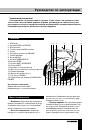
Instruction manual Dear customer! Thank you for purchasing our product. For safety, it is strongly recommended to read this manual carefully before connecting, operating and/or adjusting the product and keep the manual for reference in future. Description 1 2 1. USB port 2. USB/PLAY/PAUSE button 3.
- Страница 3 из 12
Instruction manual Power supply Battery operation • Open the battery compartment cover. • Insert 6 batteries (UM-2/LR14). Please observe correct battery polarities or the set will not work. • Close the battery compartment cover. AC operation • Before the first connecting of the appliance check that
- Страница 4 из 12
Instruction manual • At anytime during playback, press USB/ PLAY/PAUSE button to pause operation of the unit. Press this button to resume operation at the same track and position. • At anytime during playback, press STOP button to stop operation of the set. This will reset the CD-player to the
- Страница 5 из 12
Instruction manual • This unit does not support USB-MP3 player, due to their inherent lack of software compatibility. Only USB “pen drives” (flash memory USB drives) can be used, for MP3 playback. • Please do not use a USB extension cable to connect your USB drive to the USB socket of this unit.
- Страница 6 из 12
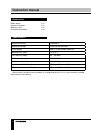
Instruction manual Accessories Radio player Instruction manual Warranty card Consumer information 1 pc 1 pc 1 pc 1 pc Specifications Supported formats CDDA/MP3 Supported storage CD/CD-R/CD-RW/USB Power supply 220 V, 50 Hz (6хUM2 batteries) Output power, RMS 1.5 W x 2 FM frequency range 64 - 108 MHz
- Страница 7 из 12
Руководство по эксплуатации Уважаемый покупатель! Благодарим Вас за покупку нашего изделия. Чтобы понять, как правильно и безопасно пользоваться Вашей моделью изделия, рекомендуется тщательно изучить настоящее руководство перед включением, регулировкой и эксплуатацией изделия. Сохраняйте
- Страница 8 из 12
Руководство по эксплуатации влаги и пыли. Убедитесь, что посторонние предметы не попали внутрь изделия; они могут вызвать сбои в работе или стать причиной поражения электрическим током. Источники питания Работа от батарей • Откройте крышку отсека для батарей. • Вставьте 6 батарей типа UM-2 или
- Страница 9 из 12
Руководство по эксплуатации Перед открытием дверцы отсека для дисков убедитесь, что ручка устройства опущена. Основные операции • Вставьте в устройство диск как описано выше. • Установите переключатель FUNCTION в положение “CD/MP3/USB”. • Диск начнет вращаться; на дисплее отобразится общее число
- Страница 10 из 12
Руководство по эксплуатации Переключение из режима USB в режим CD/MP3 Нажмите кнопку STOP. Нажмите и удерживайте кнопку USB/PLAY/PAUSE более двух секунд. Диск начнет вращаться; будет выполнена проверка содержимого диска. Затем начнется воспроизведение первого трека. Никогда не извлекайте из
- Страница 11 из 12
Руководство по эксплуатации если прибор не будет использоваться на протяжении продолжительного времени или работает от сети питания. • Предохраняйте Ваше устройство от попадания влаги или воздействия высокой температуры. • Не используйте устройство в местах, где оно может подвергнуться воздействию
- Страница 12 из 12