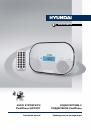
Инструкция для Hyundai H-AS1201iu
 1
 2
 3
 4
 5
 6
 7
 8
 9
 10
 11
 12
 13
 14
3
Instruction manual
Utilization of the product
If you want to dispose this product, do not
mix it with general household waste. There is a
separate collection system for used electronic
products in accordance with legislation that
requires proper treatment, recovery and
recycling.
Please contact your local authorities for
the correct method of disposal. By doing so,
you will ensure that your disposed product
undergoes the necessary treatment, recovery
and recycling and thus prevent potential
negative effects on the environment and
human health.
Important safeguards
• The instruction manual contains important
operating and maintenance instructions. For
your safety, it is necessary to refer the manual.
Keep the manual for use in future.
• Do not hit or drop the unit.
• Do not expose the unit to vibration, direct
sunlight, too high or low temperature or humidity.
• Do not disassemble the unit yourself.
Refer servicing to qualified service personnel.
Power supply
• Before the first connecting of the appliance
check that voltage indicated on the rating label
corresponds the mains voltage in your home.
• Insert the plug into power supply.
Caution:
Always unplug the appliance from
power supply, when no use long time.
Battery backup system
This unit uses 2 AAA batteries (not included)
to maintain the time and alarm settings in case
if the device is accidentally unplugged, or if
you experience a temporary power failure.
To keep the backup system operational you
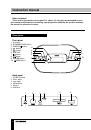
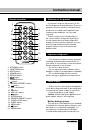
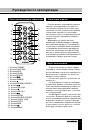
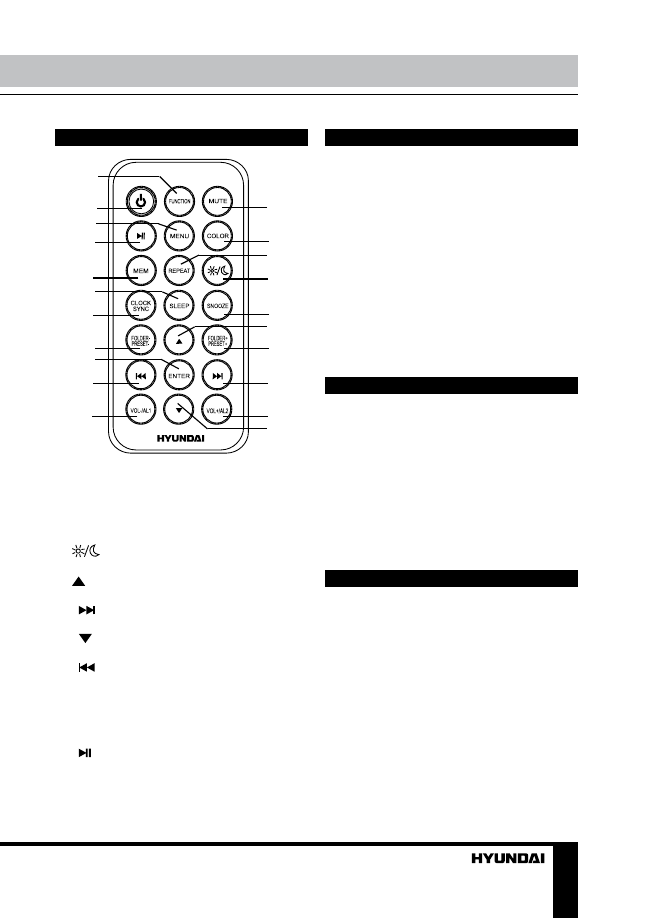
Remote controller
1. STANDBY button
2. FUNCTION button
3. MUTE button
4. COLOR button
5. REPEAT button
6.
button
7. SNOOZE button
8. button
9. FOLDER+/PRESET+ button
10.
button
11. VOL+/AL2 button
12. button
13. VOL-/AL1 button
14.
button
15. ENTER button
16. FOLDER-/PRESET- button
17. CLOCK SYNC button
18. SLEEP button
19. MEM button
20. button
21. MENU button
1
2
3
4
5
6
7
8
9
10
11
12
13
14
15
16
17
18
19
20
21
Оглавление инструкции
- Страница 1 из 15
H-AS1201IU AUDIO SYSTEM WITH iPod/iPhone SUPPORT АУДИОСИСТЕМА С ПОДДЕРЖКОЙ iPod/iPhone Instruction manual Руководство по эксплуатации
- Страница 2 из 15
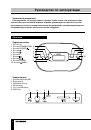
Instruction manual Dear customer! Thank you for purchasing our product. For safety, it is strongly recommended to read this manual carefully before connecting, operating and/or adjusting the product and keep the manual for reference in future. Description Front panel 1. IR sensor 2. STANDBY/FUNC
- Страница 3 из 15
Instruction manual Remote controller Utilization of the product 2 1 21 20 3 4 5 19 18 6 17 7 8 9 16 15 14 10 13 11 12 1. STANDBY button 2. FUNCTION button 3. MUTE button 4. COLOR button 5. REPEAT button 6. button 7. SNOOZE button 8. button 9. FOLDER+/PRESET+ button 10. button 11. VOL+/AL2 button
- Страница 4 из 15
Instruction manual should install a pair of new batteries every 6 to 9 months. General operations Power on/off When the unit is connected to the current supply mains, press STANDBY/FUNC button to switch the power on. The backlight on the front panel will light up. To turn the unit to standby mode
- Страница 5 из 15
Instruction manual under the selected number. You can have maximum 30 stations in the memory. • To call a saved station, press PRESET/ button and select a saved preset with / buttons. iPod/iPhone docking • Connect your iPod or iPhone to the jack. Be careful, the jack can be easily damaged. Ensure
- Страница 6 из 15
Instruction manual your USB device or memory card. Note: Although this product is fully compatible with USB 2.0 and SD card standard formats, a small percentage of USB flash drives and SD cards might not be readable, due to those device manufacturers’ noncompliance with the full (official) USB and
- Страница 7 из 15
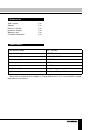
Accessories Audio system Adapter Remote controller Instruction manual Warranty card Consumer information 1 pc 1 pc 1 pc 1 pc 1 pc 1 pc Specifications FM frequency range 64 - 108 MHz Supported storages USB/SD Nominal voltage 100-240V ~ 50/60Hz Adaptor output power DC 9V 2A Nominal power consumption
- Страница 8 из 15
Руководство по эксплуатации Уважаемый покупатель! Благодарим Вас за покупку нашего изделия. Чтобы понять, как правильно и безопасно пользоваться Вашей моделью изделия, рекомендуется тщательно изучить настоящее руководство перед включением, регулировкой и эксплуатацией изделия. Сохраняйте
- Страница 9 из 15
Руководство по эксплуатации Пульт дистанционного управления 2 1 21 20 3 4 5 19 18 6 17 7 8 9 16 15 14 10 13 11 12 Утилизация изделия Если вы желаете утилизировать данное изделие, не выбрасывайте его вместе с обычным бытовым мусором. Существует отдельная система сбора использованных электронных
- Страница 10 из 15
Руководство по эксплуатации Питание устройства • Перед первым использованием устройства проверьте, соответствует ли электропитание устройство, указанное в таблице с техническими характеристиками, электропитанию в Вашей локальной сети. • Вставьте вилку электрошнура в розетку. Внимание: Всегда
- Страница 11 из 15
Руководство по эксплуатации Нажимайте кнопку EQ для выбора режима эквалайзера: ROCK/CLASS/FLAT/POP/ JAZZ. Режимы работы Нажимайте кнопку MODE на ПДУ или STBY/MODE на панели, чтобы выбрать режим работы устройства: внешнее аудиоустройство с линейного входа (LINE) => радио => USB => SD. Режимы USB и
- Страница 12 из 15
Руководство по эксплуатации • Войдите в режим iPod/iPhone/ • Выберите видеофайл на Вашем iPod/ iPhone. • iPod: В главном меню выберите пункт с настройками видео. • iPod: Убедитесь, включен режим TV OUT. • iPod: Перейдите обратно в медиатеку и запустите видеофайл. Внимание: на iPod touch/iPhone
- Страница 13 из 15
Руководство по эксплуатации устройства, и на дисплее отобразится последний установленный будильник. Зажмите эту кнопку, чтобы войти в режим настройки будильника. Часы начнут мигать. Нажимайте кнопки / чтобы установить час. Чтобы перейти к минутам, нажмите кнопку /- ещё раз. С помошью кнопок /
- Страница 14 из 15
Технические характеристики FM-диапазон радиочастот 64 - 108 MГц Поддержка носителей USB/SD Входное напряжение адаптора 100-240В ~ 50/60Гц Выходное напряжение адаптора 9В постоянного тока / 2А Номинальная мощность динамиков 2 х 3Вт Номинальная потребляемая мощность 15Вт Вес нетто/брутто 0,9кг /
- Страница 15 из 15