Инструкция для Hyundai H-1625
 1
 2
 3
 4
 5
 6
 7
 8
 9
 10
 11
 12
 13
5
Instruction manual
information. If no tracks are found in the
storage device, NO SONG will be displayed.
Playback operations
• During playback press button to pause
playback. Press this button again to resume
playback.
• During playback press
/
buttons to
go to previous or next track.
• To adjust volume, press repeatedly VOL+/
VOL- buttons.
• During playback press SET button, then
press VOL+/VOL- buttons to select equalizer
mode: Normal - Classic - Bass - Live - Rock.
The mode will be displayed blinking. Press
SET button, then press VOL+/VOL- buttons to
select playback mode: All - Shuffle - Repeat
One - Repeat All. Press SET button to confirm.
During play mode selection, if no button
is pressed within several seconds, the unit will
return to normal playback mode.
• When all tracks are played or pause mode
is enabled, the unit will go to clock mode after
30 seconds if no buttons are pressed.
• In playback mode, press MODE button
switch off the player and go to clock mode.
If afterward you press button, the unit will
resume playing the last played track.
General USB/SD/MMC notes
• This unit is equipped with a USB socket
that can accept and play MP3 files stored on
standard USB flash (compatible with USB
version 2.0) up to 32 Gb.
• This unit is also equipped with an SD/
MMC card socket that can accept and play
MP3 files stored on standard SD/MMC cards
up to 16 Gb.
Always switch off the unit or change
mode to another one before removing a
USB flash drive or SD/MMC card, to prevent
damage to your USB device or memory card.
Note:
Although this product is fully
compatible with USB 2.0 and SD/MMC card
standard formats, a small percentage of USB
flash drives and SD/MMC cards might not be
readable, due to those device manufacturers’
non-compliance with the full (official) USB and
SD/MMC card standards.
• FAT32 file system is supported by USB
and SD/MMC of this unit.
Alarm operation
Setting the alarm
• In clock mode press MODE button; the
word ALARM and bell icon will be displayed. The
alarm is in OFF state and on AM12:00 by default.
Press ALARM button to switch on/off the alarm.
• Press and hold SET button, then press
repeatedly SET button to go to setting of
parameters in following sequence: alarm
minute => alarm hour => alarm sound (MP3/
FM/Bibi). The selected parameter will blink
meaning readiness for adjustment.
• Press VOL+ button to adjust the parameter
up. Press VOL- to adjust the parameter down.
• In alarm time setting mode, if no button is
pressed within 30 seconds after a parameter
is selected, the unit will automatically return to
clock mode.
• In alarm time setting mode, press MODE
button to return to clock mode.
Radio/MP3 as alarm
• To use radio as alarm sound, enable radio
mode, select a station, then press and hold
ALARM button. AL SET will be displayed.
• To use MP3 as alarm sound, connect a
USB or memory card, then enable USB/SD/
MMC mode. Press
/
buttons to select a
track, then press and hold ALARM button. AL
SET will be displayed.
When select MP3 as alarm sound, the
alarm sound will change to Bibi automatically if
the current mode is USB/SD/MMC or Radio, if
USB/SD/MMC device is not detected or if the
external power supply is disconnected.
Alarm switch off and Snooze
• When the alarm signal is on, press
SNOOZE button to interrupt the alarm signal
Оглавление инструкции
- Страница 1 из 14
H-1625 PORTABLE RADIO RECEIVER ПОРТАТИВНЫЙ РАДИОПРИЕМНИК Instruction manual Руководство по эксплуатации
- Страница 2 из 14
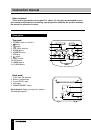
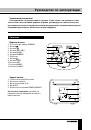
Instruction manual Dear customer! Thank you for purchasing our product. For safety, it is strongly recommended to read this manual carefully before connecting, operating and/or adjusting the product and keep the manual for reference in future. Description Top panel 1. SD/MMC memory card slot 2.
- Страница 3 из 14
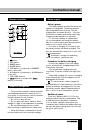
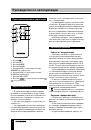
Instruction manual Remote controller Power supply 5 1 2 6 7 3 4 8 1. button 2. SET button 3. MODE button 4. RADIO button 5. SNZ button (corresponds to SNOOZE button on the unit) 6. ALM button (corresponds to ALARM button on the unit) 7. VOL+/VOL- buttons 8. / buttons (correspond to / buttons on the
- Страница 4 из 14
Instruction manual General operations Power on/off When the unit is connected to the current supply mains, slide POWER switch to ON position to switch the power on. To switch the power off, slide POWER switch to OFF position. Clock and calendar • In clock mode (no ALARM indication) press and hold
- Страница 5 из 14
Instruction manual information. If no tracks are found in the storage device, NO SONG will be displayed. Playback operations • During playback press button to pause playback. Press this button again to resume playback. • During playback press / buttons to go to previous or next track. • To adjust
- Страница 6 из 14
Instruction manual for 3 minutes. After 3 minutes the alarm sound will go on again. • When the alarm signal is on, press any button (except SNOOZE) to switch off the alarm sound completely. Snooze function is only available if Bibi sound is selected for alarm signal. Sleep timer • In USB/SD/MMC
- Страница 7 из 14
Руководство по эксплуатации Уважаемый покупатель! Благодарим Вас за покупку нашего изделия. Чтобы понять, как правильно и безопасно пользоваться Вашей моделью изделия, рекомендуется тщательно изучить настоящее руководство перед включением, регулировкой и эксплуатацией изделия. Сохраняйте
- Страница 8 из 14
Руководство по эксплуатации Пульт дистанционного управления 5 1 6 2 7 3 8 4 комнатах, около кухонных плит, отопительного оборудования. • Не разбирайте корпус устройства самостоятельно. Доверяйте ремонт устройства только квалифицированным специалистам. В приборе находятся оголенные провода высокого
- Страница 9 из 14
Руководство по эксплуатации ряда автоматически прекращается. После этого разъем адаптера нужно извлечь из входа для адаптера. В целях безопасности не заменяйте отдельные части аккумулятора и его компоненты, а также не разбирайте его. Рекомендуется пользоваться только той батареей и адаптером,
- Страница 10 из 14
Руководство по эксплуатации ты нажимайте кнопки / . Для автоматического поиска радиостанции нажмите и удерживайте кнопку или ; устройство выполнит поиск ближайшей станции с сильным сигналом и после ее нахождения начнет ее вещание. Повторите эту операцию для поиска других доступных станций. • Чтобы
- Страница 11 из 14
Руководство по эксплуатации накопителя объемом до 32 Гб и воспроизведения с него MP3-файлов (совместим с версией USB 2.0). • Устройство также оснащено разъемом для карт памяти SD/MMC объемом до 16 Гб, с которых возможно воспроизведение MP3-файлов. Внимание: Всегда выключайте устройство или
- Страница 12 из 14
Руководство по эксплуатации задать время, по истечении которого устройство автоматически отключится. При каждом нажатии время будет изменяться на 10 минут. Вы можете установить интервал автоотключения от 10 минут до 3 часов. После того, как время таймера будет установлено, нажмите кнопку ALARM для
- Страница 13 из 14
- Страница 14 из 14