Инструкция для Hyundai H-CMMD4046
 1
 2
 3
 4
 5
 6
 7
 8
 9
 10
 11
 12
 13
 14
 15
 16
 17
 18
 19
 20
 21
 22
 23
 24
 25
 26
 27
 28
 29
 30
 31
 32
 33
 34
 35
 36
 37
 38
 39
 40
 41
 42
 43
 44
 45
 46
 47
 48
 49
 50
 51
 52
 53
 54
 55
 56
 57
 58
 59
 60
 61
 62
 63
 64
 65
 66
 67
 68
 69
 70
 71
 72
 73
 74
 75
 76
 77
 78
 79
 80
 81
 82
 83
 84
 85
 86
 87
 88
 89
 90
 91
 92
 93
 94
 95
 96
 97
 98
 99
 100
 101
 102
 103
 104
 105
 106
Оглавление инструкции
- Страница 1 из 107
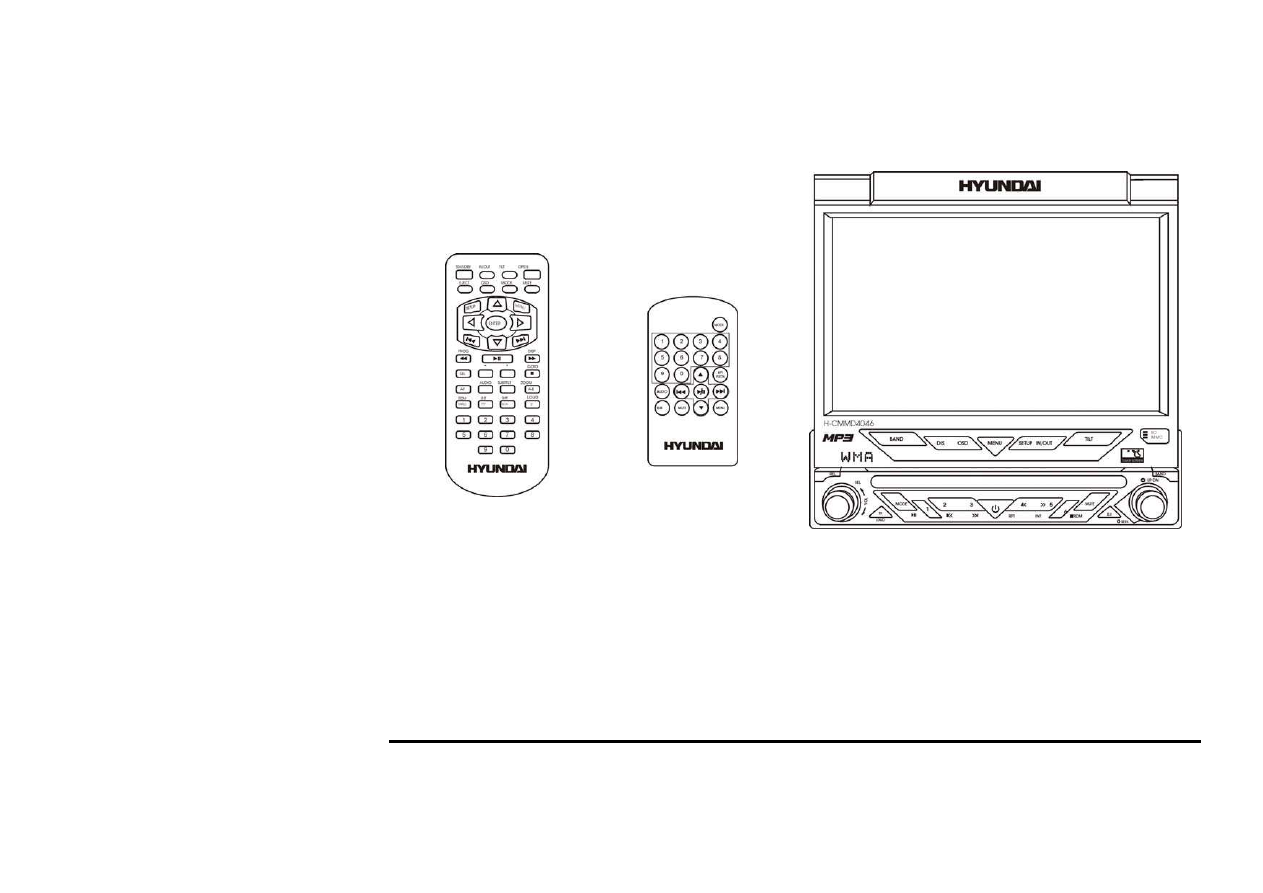
H-CMMD4046 MULTIMEDIA DVD-RECEIVER WITH MOTORIZED 7” TFT DISPLAY Instruction manual DVD7” TFT
- Страница 2 из 107
Dear customer! Thank you for purchasing our product. For safety, it is strongly recommended to read this manual carefully before connecting, operating and/or adjusting the product and keep the manual for reference in the future. Table of contents Table of
- Страница 3 из 107
Mute function ......................................................................................................................................... 25 Setting the audio system
- Страница 4 из 107
GOTO function(for DVD/VCD discs) ................................................................................................... 35 Direct chapter/ track selection (for CD/VCD discs)............................................................................... 36 Audio track and channel
- Страница 5 из 107
Other options ................................................................................................................................................. 47 Anti-theft system
- Страница 6 из 107
Important safeguards • • • • • • • • • • • • Using the device at temperature below -10º may cause the breakage of the device. BEFORE USING PLEASE HEAT UP THE PASSENGER COMPARTMENT TO THE RECOMMENDED TEMPERATURE! Read carefully through this manual to familiarize yourself with this high-quality sound
- Страница 7 из 107
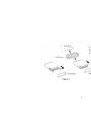
Installation/ connection This unit can be installed in any dashboard having an opening as shown on the picture. The dashboard should be ~ 4.5 – 5.5 mm thick in order to be able to support the unit. Installation 1. 2. 3. 4. Insert the HALF SLEEVE into the dashboard (1), and bend the mount tabs
- Страница 8 из 107
8
- Страница 9 из 107
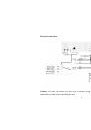
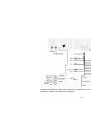
Electrical connection Caution: For some car models you may need to modify wiring of the supplied power cord. Contact your authorized car dealer before installing this unit. 9
- Страница 10 из 107
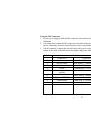
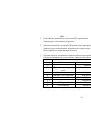
Using the ISO Connector 1. If your car is equipped with the ISO connector, then connect the ISO connectors as illustrated. 2. For connections without the ISO connectors, check the wiring in the vehicle carefully before connecting, incorrect connection may cause serious damage to this unit. 2. Cut
- Страница 11 из 107
Unit controls Monitor 1. BAND button Press it repeatedly to select your desired radio band during TUNER (RADIO) mode. 2. DIS / OSD butonn - Use DIS to show the time and the song name when playing a disk or SD/MMC card. - Use OSD to set up OSD. 3. MENU button Use it to show the MENU on the display
- Страница 12 из 107
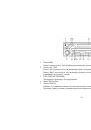
Front panel 1. 2 3 4 5 6 7 REL button Use it to detach the front panel. The system will turn the power off automatically in 20 seconds. AF/REG button Use it to enable or disable AF mode (ALTERNATIVE FREQUENCY). To enable or disable REG mode (REGIONAL) press and hold on within 3 seconds REG button.
- Страница 13 из 107
8 9 10 11 12 13 14 15 16 17 Rotate VOL button clockwise to increase the volume level; rotate anticlockwise to decrease the volume level. Press SEL button to set the characteristics: BASS, TREBLE, BALANCE L-R, FADER, BRIGHT, CONTRAST, COLOUR SHARP Press and hold the button for more than two seconds
- Страница 14 из 107
19 - 5 WAY JOYSTICK CONTROLLER DVD mode: use the knob to choose DVD title menu and ENTER to to select. KARAOKE mode option: use it to choose a song and ENTER to start. TV mode (optional): use it (LEFT / RIGHT) for TV channels search. Use ENTER to save current channel manually. - CD/SD/MMC mode: use
- Страница 15 из 107
Remote control for the unit 1. STANDBY button Press the button to turn the power on, press again to turn the power off. 2. IN/OUT button Press the button to move the monitor forward or backwards in three steps when the monitor is opened. 3. EJECT button 4. OSD button Press it to enter OSD setup
- Страница 16 из 107
9. 10. 11. 12. 13. 14. 15. 16. 17 18 19 20 AUDIO button In DVD mode press it to change the audio language. AF button Press it to enable AF function. INTRO button (INT) Press it to start INTRO playing ( first 10 seconds of the track). RANDOM button (RDM) Press it to start RANDOM playing. PTY button
- Страница 17 из 107
21 PLAY/PAUSE / ENTER / SCAN button In the menu press the ENTER button to confirm adjustment. In DVD mode press the PLAY/PAUSE button to start playback. Press again to go into pause mode. In TUNER (RADIO) mode press it to start scan playing of the radio stations. 22 DISP button To show the time and
- Страница 18 из 107
Remote control for the second monitor 1 NUMBERED buttons 2 AUDIO button To change the audio language. 3 SUBTITLE button (SUB) to change the subtitle language. 4 MUTE button 5 / 3456 buttons Use these buttons to to go to previous/ next chapter or track, to go to previous/ next chapter or track, to
- Страница 19 из 107
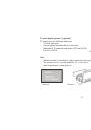
Changing the battery 1. Press the catch and at the same time pull out the battery tray (pic. 1). 2. Insert the 1 x lithium battery, type CR2025 (3V) battery with the stamped (+) mark facing upward. Insert the battery tray into the remote control (pic.2). Pic. 1 Pic. 2 Warning: Store the battery
- Страница 20 из 107
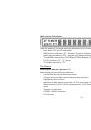
Mini coloured LCD display When the monitor is closed the following indication will be available: - Basic Radio, CD or DVD information - RDS functions indicators (AF – alternative frequency indicator; TA – traffic announcement indicator; TP – traffic program indicator; PTY – program type function
- Страница 21 из 107
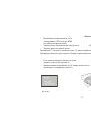
TV mode display (picture 3) (optional) TV display gives the following indications: - TV mode indication - Current channel indication that is of red coluor. - Indication of TV channels setup mode: AUTO, MANUAL, P.SCAN, A.SAVE. Picture 3 Note: - When the monitor is turned left or right it cannot be
- Страница 22 из 107
Monitor operations Open/close TFT monitor 1. Press the OPEN/CLOSE button on the panel to open the monitor to the last viewing position. 2. Press the OPEN/CLOSE button to load the monitor to the unit. Monitor tilt angle adjustment • Press TILT on the panel or on the remote control to change the
- Страница 23 из 107
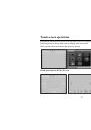
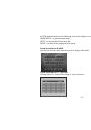
Touch screen operations In any mode touch the left corner of the top area of the TFT display to open the main menu. Touch any point of the up right coner to display dual zone menu. Now you may touch and choose any option to operate. Touch operations for DVD / SD card 23
- Страница 24 из 107
In DVD playback mode use the following areas of the display to use the desired function: MAIN MENU - to open the main menu; NEXT - to start playback of the next file; MENU – to show on the display the disk menu Touch operations for RADIO You may set and save radio stations as well as change radio
- Страница 25 из 107
General operations Reset the unit Operating the unit for the first time or after replacing the car battery, you must reset the unit. Press the RESET button on the front panel to restore the unit to the original factory settings. Power on/off Press POWER/MUTE button on the front panel or the STANDBY
- Страница 26 из 107
Note: If turning off the ACC power all the settings will become as they were set on the plant as current. If you don’t adjust VOL knob within 3 seconds after selecting the desired setting, the unit will automatically return to the current mode being displayed. Mode selecting Press the MODE button
- Страница 27 из 107
Digital tuner operations Note: RDS service availability varies with areas. Please understand if RDS service is not available in you area, the following service is not available, either. To activate this function enter RDS Menu by pressing TA/LOUD button on the Remote C ontrol. Mode selecting Press
- Страница 28 из 107
To return to main menu touch the RADIO button in the top left corner of the display. Band selection Press BAND button on the front panel once or more to select: FM1, FM2, FM3, AM1, AM2 in Radio mode and BAND1 or BAND2 in TV mode (optional). Manual / automatic tuning • Manual tuning: Press the /
- Страница 29 из 107
Preset scan function • Preset scan: Press the P.SCN button on the panel or press and hold for 2 seconds the RPT/P.SCN button on the RC to scan all preset stations in the memory of the current band and stay on each memory stations for about 5 seconds. To stop preset scan, press this button again. •
- Страница 30 из 107
PTY (Program Type) function Selecting the PTY 1. In TUNER (RADIO) mode press the TP/LOUD button to enter RDS menu. 2. Use of the 5 WAY JOYSTICK CONTROLLER or on the Remote Control to choose PTY option, press ENTER to set it ON. 3. Choose the desirable type of program and start the search using of
- Страница 31 из 107
Disc operations Glossary PBC (PlayBack Control) PlayBack Control is a menu recorded on the disc with SVCD or VCD2.0 format. For the discs contained PBC, it can playback interactive software with the menu displayed on TV. And if the disc contains still images, it can playback high definition of
- Страница 32 из 107
Discs for playback • This unit can play disc types: CD/DVD/CDDA/CD-R/-RW/DVD±R/±RW. • Compatible with formats: DVD-video/SVCD/VCD/HDCD/MP3/MP4/WMA/Picture-CD/JPEG. • The following file types are supported: Audio files: MP3 (*.mp3) WMA (*.wma) Video files: MP4 (*.avi, DIVX3.11/4.0/5.0/6.0 and XVID)
- Страница 33 из 107
Loading a disc 1. Turn the pwer on (STANDBY button). 2. Insert the disc with the printed side facing upward into the slot. The unit will switch to DVD mode automatically. 3. Press the EJECT button on the panel to eject the disc. Playing/ pausing To ensure good system performance, wait until the
- Страница 34 из 107
Scanning forward and backward 1. Press the / buttons on the RC or button on the panel to select the speed of fast playing in forward direction: X2 => X4 => X8 => X16 =>X32. Press the PLAY/PAUSE button to return to normal playback. Note: During the disc playback when Fast Playback gets to the
- Страница 35 из 107
Random playback (for DVD/CD/VCD/MP3 discs) During disc playback, press the RDM button on the panel or RDM/BAND on the RCto start random playback of the disc. Press again to cancel. Intro playback (for CDDA/VCD discs) You can play the beginning of every track for 10 seconds in sequence. Keep on
- Страница 36 из 107
Use ▲/▼ cursor buttons on the panel or / button on the RC to select the type of search. For Title/Chapter search: use ▲/▼ buttons on the RC to choose the desired option and ENTER button to enter.Use numeric buttons to enter the desired number of title and chapter. For example, to enter the number
- Страница 37 из 107
3. 4. 5. The VCD starts playing the selected title automatically or press PLAY/ PAUSE button to confirm the selected track for playback. Press STOP button to return to menu. Press MENU again to exit menu. Programming the playback 1. Press the PROG / button on RC to enable the program function. 2.
- Страница 38 из 107
Video Menu You may adjust BRIGHT, CONTRAST, COLOUR AND SHARPNESS Screen Menu PICTURE: inverting the screen picture from normal to upside down FULL: changing to full screen mode. Use the Joystick Key. NORMAL: return to normal screen mode System Menu You may adjust the monitor position (IN/OUT FIX,
- Страница 39 из 107
MP3 overview Notes on MP3: • MP3 is short for MPEG Audio Layer 3 and refers to an audio compression technology standard. • This product allows playback of MP3 files on DVD-R/-RW, DVD+R/+RW, CD-ROM, CD-R/-RW discs. • The unit can read MP3 files written in the format compliant with ISO 9660. However
- Страница 40 из 107
• • • • • Make sure that when MP3 CD-R or CD-RW is burned that it is formatted as a data disc and NOT as an audio disc. You should not write non-MP3 files or unneeded folders along with MP3 files on the disc otherwise it takes a long time until the unit starts to play MP3 files. With some CD-R or
- Страница 41 из 107
TV tuner operations (optional) Switch to TV tuner mode 1. Connect the TV set to the unit. 2. Press the SRC button repeatedly to select the TUNER (TV) mode. OR in the SYSTEM SETUP menu select the TV item. Auto tuning 1. Press the ◄/► button on the panel or the / button on the RC to start auto search
- Страница 42 из 107
To change the station use the / buttons on the RC or ▲/▼ buttons on the panel to change the channels step by step in forward/backward direction. Display TV station To display current TV station number press the DISP button on the RC. 2. AUX IN mode This mode is for using the unit as an AV signal
- Страница 43 из 107
System setup menu .Use SETUP option to setup system function. Press SETUP to open the SETUP menu. Use cursor buttons to select the page: GENERAL SETUP, AUDIO SETUP, VIDEO SETUP, DOLBY PREFERENCE SETUP, or PREFERENCE SETUP. General setup • • • • • TV DISPLAY Normal/PS: When the unit connects to the
- Страница 44 из 107
Audio sound processing configuration • SPEAKER SETUP - DOWNMIX LT/RT: The audio out is Left and Right channels format even if the original sound is 5.1 CH format. Stereo: The audio out format is stereo even if the original sound is 5.1 CH format. V surr: The audio out is virtual surround sounds
- Страница 45 из 107
- • • • DYNAMIC If watching large dynamic scope movie program at night, to select this mode you can reduce the volume to a very low level, at the same time, to keep the fine details sounds. In this case, this doesn't disturb the family and keep the quality sounds. EQUALIZER - EQ TYPE 8 EQ modes are
- Страница 46 из 107
Preference page • TV TYPE This unit is suitable for all kinds of TV systems. You can select one of the PAL, NTSC or Multi. Multi: the TV system is auto switched according to the disc system. NTSC: this system is used in USA, Taiwan, Japan etc. PAL: this system is used in China, Europe, Hong Kong
- Страница 47 из 107
• PASSWORD When the password mode is ON you can change the password. Select PASSWORD => CHANGE. Use the cursor buttons to select the desired field. In the OLD PASSWORD field insert the old password or 136900 (if you forget the old one). In NEW PASSWORD field insert the new password. Insert it again
- Страница 48 из 107
Anti-theft system This unit is equipped with a mask panel which can be detached and taken with you, helping to deter theft. Detaching the front panel 1. 2. 3. Press the POWER button to turn the power off. Press the RELEASE button on the front panel and pull it towards you and slightly to the left.
- Страница 49 из 107
Handling and cleaning discs • • • • • • • Dirty, scratched or warped discs may cause skip ping or noise. Handle the disc only by the edges. To keep clean do not touch its surface. Discs should be stored in their cases after use to avoid scratches. Do not expose discs to direct sunlight, high
- Страница 50 из 107
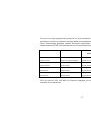
Troubleshooting guide Symptom Cause Solution No power. The car ignition is not on. The fuse is blown. If the power supply is properly connected to the car accessory switch the ignition key to “ACC”. Replace the fuse. Disc cannot be loaded. Presence of disc inside the player. Remove the disc in the
- Страница 51 из 107
Specification General Power supply: Current consumption: Maximum power output: Compatible formats: 12 V DC max. 10 A 50 W x 4 channels DVD/SVCD/VCD/HDCD/MPEG4/MP4/WMA/CDDA/Picture-CD/JPEG/ CD-R/-RW/DVD±R/±RW playback Dimensions (L x W x H) / weight: 78 x 190 x 50 mm / 2.5 kg Working temperature
- Страница 52 из 107
AM section Frequency Range: Preset memory stations: 522 kHz - 1620 kHz 12 DVD player Signal / NoiseRatio Dynamic Range Distortion Frequency Range Maximum Output Power Loaded Impedance 90dB 90 dB 0.1% 20Hz ~ 20KHz 50 Wx4 4Ω AUX IN Distortion Frequency responce Audio Input level 0,5% 20Hz ~ 20KHz 1
- Страница 53 из 107
! . , / , . .................................................................................................................................................. 53 ............................................................................................................................ 57 /
- Страница 54 из 107
/ ....................................................................................................... 78 ........................................................................................................................ 78
- Страница 55 из 107
..................................................................................................................................... 87 ( DVD/CD/VCD/MP3) .......................................... 87 INTRO ( CDDA/VCD)
- Страница 56 из 107
......................................................................................... 103 .................................................................................................................... 104 56
- Страница 57 из 107
• -10º • • • . ! , . . , , . , • . . • - , , . , • . . , , • , . . • , • , , . , , • • , , , . . , . , . . , . 57
- Страница 58 из 107
/ , , ~ 4,5 – 5,5 . , . 1. ; , , , . 4 . )( 2 1). 2. ( 2). 3. ), . 4. . 4 2 ). 5. .( 3). 58
- Страница 59 из 107
: . , 1 59 .
- Страница 60 из 107
: . . 60
- Страница 61 из 107
ISO 1. ISO, . , 2. ISO , . 3. , , : A B (+)--(-)--- 1 2 3 4 5 6 7 8 (+)--(-)--/ (+)--((-)--/ (+)--(-)--/ 12 (+)/ / ACC+/ / 61 /
- Страница 62 из 107
1. BAND TUNER ( ) , 2. - . DIS / OSD DIS: , . - OSD: OSD 3. MENU 4. - SETUP / IN / OUT SETUP: 5. DVD. IN / OUT: TILT - (5 . 62 ) .
- Страница 63 из 107
1 REL 2 AF / REG AF REG . . « « 3 3 PTY ( » ( ). ) « 4 5 ». » P.SCAN . 1-6 63
- Страница 64 из 107
6 / 7 , VOL / / SEL. . , , , 8 9 10 . ( SEL), : BASS => TREBLE => BALANCE L-R => FADER => BRIGHT => CONTRAST => COLOR => SHARP. , . SEL 2 , : LOC => LOUD => STEREO / MONO => TIME => TA VOL => EON=>DUAL ZONE. TP / LOUD RDS / LOUD. MODE : => 11 12 13 14 AUX. / / (RPT) / => DVD => SD => TV ( . / POWER
- Страница 65 из 107
16 17 18 19 - MUTE EJECT. DVD . ENTER. ENTER, : TV ( ). . ENTER . 20 ,CD /SD MMC . ENTER . . - ENTER. TV (FM1 =>FM2 => FM3 => AM1 => AM2; BAND1 => BAND BAND2) 65
- Страница 66 из 107
1. 2. STANDBY , , IN/OUT . . , ( 3 / ). EJECT , 4 . OSD , 5 . SETUP DVD 6 3456 DVD , . , / / 7 . PROG , . 8 SEL 66 ,
- Страница 67 из 107
, : BASS => TREBLE => BALANCE L-R => FADER => BRIGHT => CONTRAST => COLOR => SHARP. SEL 2 , SEL, : LOC => LOUD =>STEREO / .MONO => TIME => TA VOL => EON. 9 AUDIO DVD , . 10 AF RADIO , / AF ( ). 11 INTRO (INT) ( ) 12 RANDOM (RDM) 13 PTY PTY ( , 14 15 , : ). P.SCAN . 16 TP / LOUD TP ( LOUD ( 17 ) )
- Страница 68 из 107
18 19 A-B / ZOOM A-B, ZOOM l / . SUBTITLE , 20 . GOTO / STOP . 21 22 / DISP - / / , . 23 / - DVD / TUNER ( / . , . ) , / 24 25 26 . ENTER MENU MODE , 27 / : SD => AUX => REAR CAMERA MUTE , 28 . TILT (5 29 OPEN/CLOSE , . 68 ).
- Страница 69 из 107
1 2 3 4 5 6 7 8 AUDIO ( SUBTITLE ( MUTE ( ) ) ) MENU ( / ) (PAY / PAUSE) / (RPT / P.SCAN) ( / 9 . MODE ( => DVD => SD => TV TUNER ( REA CAM => AUX IN). : RADIO TUNER ) => 69
- Страница 70 из 107
: 1. 2. , (CR 2025 3V), ( . ( . 1). . 2). : .1 . .2 , . ( –6 ). . . 70
- Страница 71 из 107
LCD - . : SCN ( ), RDM ( - ), RPT ( LOUD. . CH ( ST ( ), DISC, RADIO ( ) ), LOC ( Tuner ( RDS: REG ( ), TA ( ), TP, AF ( PTY ( ) . . ) (Pictures 1-2) ), 1 ), INFO ( - ), ). . . . ST ( LOC ( ) . ) 2 . 71
- Страница 72 из 107
(Picture 3) ( ( ), RPT ( - : SCN ), RDM ), ( Picture 3 ). . TV : /P , . : - , (picture 4). - 30° (picture 5). Picture № 5 Picture № 4 72
- Страница 73 из 107
/ 1. OPEN/CLOSE, . , . 2. OPEN/CLOSE, . 1. ( ). 2. / • • • : On ( .) ( . ); Off ( .) ( . OPEN/CLOSE, Manual ( ); )( OPEN/CLOSE, / ). , • • • . , TILT . , ( . DVD 73
- Страница 74 из 107
). • CINEMA ( 1. : 16:9 (wide screen), 4:3 (normal view). WIDE , ) => STANDBY ( ). WIDE/PIC ) => NORMAL ( ▲/▼ ), BRIGHT ( ◄/► SEL ), CONTRAST ( / ( 2. . « », , . 74 , ). : : COLOR ,
- Страница 75 из 107
, OPEN , . . OPEN , RESET, . 75
- Страница 76 из 107
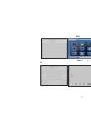
, (MENU), , TFT. . . , . DVD DVD – B– DISP C– D– E– F– STOP, (MENU) ( ) : MENU, PLAY/PAUSE, , , , . 76 :
- Страница 77 из 107
DVD MP3/WMA Tuner ( TV 77 )( )
- Страница 78 из 107
RESET. : , , . / POWER/MUTE STANDBY , . STANDBY 2 , . , : , . VOL + , . VOL , . . : , , 1. POWER/MU , . SEL ( ) 78 , MUTE . .
- Страница 79 из 107
2. 3. ◄/► / , BASS, TREBLE, BALANCE L-R, FADER, BRIGHT, CONTRAST, COLOUR SHARP. ▲/▼ , . 2 . : . 3 , , . MODE => TV TUNER ( , DVD , Loud. TUNER ( ) , . : : RADIO TUNER => DVD => SD l) => REA CAM => AUX IN DISP, : DISP, , : 79
- Страница 80 из 107
: RDS RDS ( ) . . , RDS, RDS ) ( ON ( MODE, (optional) => REA CAM => AUX IN. , , .). : RADIO TUNER => DVD => SD => TV TUNER : , RADIO 1. 2. 3. 4. 5. 6. 7. 8. 9. 10. . , . RDS (AF, TA, TP, PTY TA VOL – EON REG, RDS / (P SCAN): 80 16 PTY) 64,
- Страница 81 из 107
P SCAN, . 1-6. RADIO B ND FM2, FM3,) AM1, AM2, AM3. / • : . STOP/BAND , : FM1, ▲/▼ / , . • 2 , . . ◄/► / : 2 , . , . . 2 , . • . 6 5 . : - • ( ). ◄/►. 1~6, . - : ( , ). 1~6. 81
- Страница 82 из 107
• P.SCN : RPT/P.SCN 5 , . . • , . P.SCN : : , ,6 1~6. P.SCN. AF ( ) , , . . AF. 2 AF / REG, RDS . AF , , . RDS , AF. . TA ( TUNER ( P ) TP / LOUD ) , TA , TP RDS , TP. , , , TP / TA TA TP / TA , , TP . , RDS 82 , TP .
- Страница 83 из 107
FM1. PTY ( , ) RDS, TUNER ( RDS . ) 2 TP / LOUD , . 2. ( ENTER, PTY, ) , . 3. . , PTY , . , , . , PTY, 1~6, , . : P1 – DNEWS, P2 – DSPEECH, P3 – DSPORT, P4 – DPOP M, P5 – CLASSIC, P6 – DMUSIC. PTY 1~6, 83 .
- Страница 84 из 107
PBC ( ) – , PBC, - - . . . . 3 ( ), , 1, 1 2 3. . , . . – . , . . 84 , , ,
- Страница 85 из 107
• • • • • • • • • • • • 1. 2. : CD/DVD/CDDA/CD-R/-RW/DVD±R/±RW. : DVD-video, SVCD/VCD/HDCD/MP3/MP4/WMA/ Picture-CD/JPEG. : : MP3 (*.mp3) WMA (*.wma) : MP4 (*.avi, DIVX3.11/4.0/5.0/6.0 and XVID) MPEG 2(*.vob) MPEG 1(*.dat) : JPEG (*.jpg) ISO 9660 ISO 9660 + Joliet 30 . – 448. -8 . – 99. - 99 59 .
- Страница 86 из 107
3. EJECT , . / , . . PLAY/PAUSE, . STOP STOP / GOTO . . PLAY/PAUSE . / 1. , / . 2. , / 3. 2- . (1-9, 0) / . 3. , 135, 1 => 3 => 5. 1. PLAY/PAUSE, : , 2. / : 2 => 4 => 8 => 16 => X32. . , . / 86 , .
- Страница 87 из 107
: 2 => 4 => 8 => 16 =>X32.. PLAY/PAUSE, . R RPT / P SCAN : Pbc . ) => REPEAT CHAPTER ( VCD/CD: VCD DVD: REPEAT TITLE ( ALL ( ). MP3: REPEAT ONE ( FOLDER ( ). , ) => REPEAT ) => REPEAT FOLDER ( ) => RPT. 1. , ( ZOOM / REPT A-B 2. , REPT A-B . , , ), . DVD/CD/VCD/MP3) RDM / BAND . ( INTRO ( . ( 3. ),
- Страница 88 из 107
/ ( DVD / VCD / CD, / / CD/VCD ) , , . ( CD/VCD/DVD AUDIO, AUDIO, ) => Stereo ( ). DVD: CD/VCD: channel ( ) . : Left channel ( ) => Right DVD 1. 2. MENU ◄/► . MENU – 3. PBC ( VCD , , . : – . )( PBC, VCD ) 1- . 1. MENU, . 2. , ▲/▼ / 3. 4. 5. , PLAY/ PAUSE, STOP, MENU, . VCD. . 88 .
- Страница 89 из 107
– . 1. 2. PROG/ , . / , . 3. 4. 5. ( ( , ▲/▼/◄/► ▲/▼/◄/►. 20) 2). START ( ) . 6. EXIT ( ) . MENU , ENTER . : DVD: SD CARD: REAR CAMERA: AUX: « DVD. ». SD . . AUX. , / BEEP 89 / ,
- Страница 90 из 107
PICTURE: FULL: . . (IN / OUT FIX, TILT RANGE), (TILT). TV PICTURE / TV SOUND: TV : NTSC / PAL / SECAM; TV : B/G, I, D/K. PAL: SOUND1 B/G, SOUND2 I, SOUND3 D/K. SECAM: SOUND1 B/G, SOUND2 L/L, SOUND3 D/K. ( DVD/VCD ) ZOOM / AB . : 1 => 2 => 3 => 4 (1\2 =>1/3 =>1/4) => . ( DVD ) . SUB-TITLE . , . / /
- Страница 91 из 107
. : MP3 CD . 6- 2- , DVD 3 • • • 3: 3 MPEG 3 3 CD-ROM, CD-R/-RW. 3, • • . DVD-R/-RW, DVD+R/+RW, , ISO 9660. 3, . 3, , “.mp3”. 3 • , “.mp3”, . , • PC “ ” “ “ ” MP3” “ ”, . 8, • • • . 448. . , , 3. 8 (VBR), , • , , . 91
- Страница 92 из 107
CD-R • MP3: CD-RW, 3 • • 44,1 128 448 3 ISO 9660, , • 8, / . . ( ). CD-R • , . , • MP3 CD-R CD-RW , . 3 • , . CD-R CD-RW . • • . 16 , CD-R . CD-RW , . 92 . 1. ID3TAG.
- Страница 93 из 107
( ) . MODE, TUNER ( TV ◄/► 1. ). . / . , , . , . 2. , . ◄/► 2 , . 1. 2 PLAY/PAUSE , . . 2. PLAY/PAUSE STOP , . 1. 10 ENTER 2. . PLAY/PAUSE STOP . 93 . ,
- Страница 94 из 107
1. 2. , . ▲/▼ / . DISP . AUX AV AUX (DVD . .). , , , – . , . AUX IN . AUX IN. 94 .
- Страница 95 из 107
• • • • • • SETUP, ◄/►, , , ▼, : , , . . ▲/▼, ►, ▲/▼, . . , ENTER, . • • . ◄, . T 4:3 PS: , , . 4:3LB: , , . , 16:9WIDE: • . DVD – 95 ,
- Страница 96 из 107
. DVD DVD . , • • . , , . , SUBTITLE . • . . , , . , . • • : : Surround: , DOLBY Pro LOGIC. , . , DOLBY SURROUND. 96 , -
- Страница 97 из 107
• - SPDIF SPDIF SPDIF ( : ), . • - SPDIF/RAW: , SPDIF/ : . . DOLBY (1+1) : : . . : . : . , . • - . . . 97
- Страница 98 из 107
• • - , , . . 3D : ., , , , , , , . HDCD ., 1 2 . - • , , , , , , . • . PAL, NTSC : . , . , NTSC: . 98 , .
- Страница 99 из 107
• • PBC PBC. , , . , . , , . • AUDIO SUBTITLE . . • ( . ) • . , => , 4 8806 ( , ). , , , . . 99
- Страница 100 из 107
- VIDEO IN CAMERA « » MODE OSD ». “REVERSE” VIDEO OUT . . CAMERA, « . - MODE, TV (optional) => OFF. - , “DUAL ZONE”, . DUAL OFF, DUAL ZONE. 100 : DVD => SD => AUX IN =>
- Страница 101 из 107
. , . 1. 2. 3. POWER, RELEASE . , . , 1. . , , . 2. , 1. 2. . . , ( 3. 1). Pic.1 ( . 2). .2 101
- Страница 102 из 107
• • , ( ). , . • • , . , , . • ( , ). • - . , • • , . . . . ( ), . . , , . . , , . . 102
- Страница 103 из 107
. , “ . ”. . . , . . . . . , . . . . . . RESET. - . . 30 . . . , 30 . . . . . . . 103
- Страница 104 из 107
: : 12 10 50 4 : : ( )/ DVD/SVCD/VCD/HDCD/MP3/MPEG4/WMA/CDDA/Picture-CD/JPEG/ CD-R/ -RW/DVD±R/±RW 178 190 50 / 2,2 -20º - +60º 40 CD, 120 3 : : ESP : 7” 480(W) 234 (H) 16:9/4:3 300:1 350 / 2 110/130 : : : : : FM : : +/- 3 dB:40Hz~12.5Kz S/N 30dB: 10dB 104
- Страница 105 из 107
18 AM : 522-1620 12 DVD 90dB 90 dB 0,1% 20 Hz~20KHz 50 Wx4 4Ω AUX IN 0,5 % 20Hz~20Hz 1 Vrms 600Ω ≥ 2.5 Vrms 1.0±0.2V (CVBS) 75Ω 105
- Страница 106 из 107
75Ω CD . 2000 PAL/SECAM/NTSC 65 . . 106
- Страница 107 из 107