Инструкция для Hyundai H-1549
 1
 2
 3
 4
 5
 6
 7
 8
 9
 10
 11
2
Instruction manual
Dear customer!
Thank you for purchasing our product. For safety, it is strongly recommended to read
this manual carefully before connecting, operating and/or adjusting the product and keep
the manual for reference in future.
Description
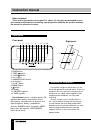
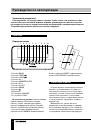
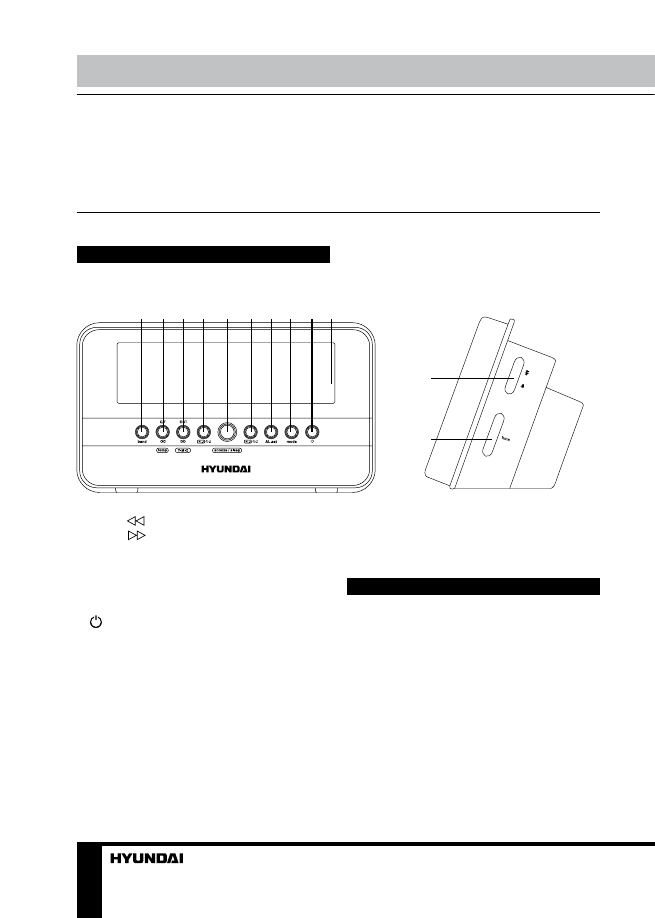
Front panel
1. BAND button
2. TEMP/
button
3. Y-M-D/
button
4. AL.1 button
5. SNOOZE/SLEEP button
6. AL.2 button
7. AL.SET button
8. MODE button
9. button
10. Display
11. VOLUME regulator
12. TUNE regulator
Not indicated:
power cord (back panel), FM
antenna (back panel), temperature sensor
(back panel), infrared sensor (top panel), line
input (top panel), battery compartment
(bottom), DIMMER switch (top panel), RESET
button hole (back panel), LIGHT ON/OFF
button (back panel).
1 2 3 4
5
6 7 8
9 10
11
12
Right panel
Utilization of the product
If you want to dispose this product, do not
mix it with general household waste. There is a
separate collection system for used electronic
products in accordance with legislation that
requires proper treatment, recovery and
recycling.
Please contact your local authorities for
the correct method of disposal. By doing so,
you will ensure that your disposed product
undergoes the necessary treatment, recovery
and recycling and thus prevent potential
negative effects on the environment and
human health.
Оглавление инструкции
- Страница 1 из 12
H-1549 RADIO WITH ALARM РАДИОПРИЕМНИК С БУДИЛЬНИКОМ Instruction manual Руководство по эксплуатации
- Страница 2 из 12
Instruction manual Dear customer! Thank you for purchasing our product. For safety, it is strongly recommended to read this manual carefully before connecting, operating and/or adjusting the product and keep the manual for reference in future. Description Front panel 1 2 Right panel 3 4 5 6 7 8 9
- Страница 3 из 12
Instruction manual Important safeguards • The instruction manual contains important operating and maintenance instructions. For your safety, it is necessary to refer the manual. Keep the manual for use in future. • Do not hit or drop the unit. • Do not expose the unit to vibration, direct sunlight,
- Страница 4 из 12
Instruction manual temperature. The temerature indicatoin will be on for 5 seconds, then the display returns to button initial mode. Press and hold TEMP/ to switch between Celsius and Fahrenheit temperature modes. Bottom backlight To switch on/off the backlight of the unit bottom, press LIGHT
- Страница 5 из 12
Instruction manual Infrared sensor • You can perform some functions with the display of this unit by placing your hand over the infrared sensor. • In radio off mode, place your hand over the sensor for 1 second; the display will show the temperature. • In radio on mode, place your hand over the
- Страница 6 из 12
Руководство по эксплуатации Уважаемый покупатель! Благодарим Вас за покупку нашего изделия. Чтобы понять, как правильно и безопасно пользоваться Вашей моделью изделия, рекомендуется тщательно изучить настоящее руководство перед включением, регулировкой и эксплуатацией изделия. Сохраняйте
- Страница 7 из 12
Руководство по эксплуатации обработке, утилизации и вторичной переработке и, таким образом, предотвратите потенциальное негативное воздействие на окружающую среду и здоровье людей. Меры безопасности • В руководстве присутствуют важные указания по эксплуатации и уходу. Перед использованием
- Страница 8 из 12
Руководство по эксплуатации выбранная индикация будет отображаться на дисплее в течение 5 секунд, после чего дисплей вернется в исходное состояние. Яркость подсветки дисплея Для установки яркости подсветки дисплея установите переключатель DIMMER в положение LOW (низкая) или HIGH (высокая). Сброс
- Страница 9 из 12
Руководство по эксплуатации • Нажмите и удерживайте кнопку AL.SET. Нажимайте эту кнопку для поочередного выбора параметра будильника для настройки в следующем порядке: часы первого будильника => минуты первого будильника => дни недели первого будильника (“1-5” означает, что будильник будет
- Страница 10 из 12
Руководство по эксплуатации Комплект поставки Радиоприемник с часами Руководство по эксплуатации Гарантийный талон Информация для потребителя 1 шт 1 шт 1 шт 1 шт Технические характеристики Номинальное напряжение питания 220 В, 50 Гц Номинальная потребляемая мощность 5 Вт Выходная мощность 350 мВт
- Страница 11 из 12
- Страница 12 из 12