Инструкция для Hyundai H-1418
 1
 2
 3
 4
 5
 6
 7
 8
 9
 10
 11
 12
 13
 14
 15

7
Cassette recorder operation
Cassette playback
Slide the FUNCTION switch to TAPE(OFF) position.
Press the STOP/EJECT button to open the cassette compartment.
Insert a cassette and push the cassette door to close the cassette compartment. The full tape reel should be on the right side.
Press the PLAY button to start the playing.
Press the PAUSE button to pause the playing. If you press it again the playback will continue.
Press the STOP/EJECT button to stop the playing, press the button again to open the cassette door and you can take out the tape.
When the tape plays to the end, playing will be stopped automatically.
Fast Forward and Rewind: You can run forward and rewind the tape. Stop playback. Use the
button for fast forward and the
button for fast
backward playback. When you have reached the desired tape position, press the STOP/EJECT button to stop the process.
Note: Never use the fast forward or rewind functions during playback. This may cause damage to the tape.
Recording
Recording from radio
Set the FUNCTION switch to FM or AM position.
Tune to the desired station by turning the TUNING control regulator.
Insert a blank cassette into cassette compartment.
Press the RECORD button. The recording will start.
For brief interruption press PAUSE. To resume recording press PAUSE again.
To stop recording press STOP/EJECT.
Recording from CD
Set FUNCTION switch to CD position.
Insert your cassette tape in the cassette compartment.
Start the desired track playback.
Press the RECORD button. The recording will start.
For brief interruption press PAUSE. To resume recording press PAUSE again.
Press STOP/EJECT button when finished. Then stop CD playback by pressing the CD STOP/FOLDER button of the CD player.
Notes:
You may want to monitor during recording. You can adjust the sound with VOLUME control regulator. These adjustments do not affect the content of
Оглавление инструкции
- Страница 1 из 16
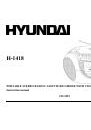
H-1418 PORTABLE STEREO RADIO CASSETTE RECORDER WITH CD/MP3 Instruction manual CD/MP3
- Страница 2 из 16
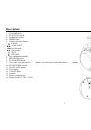
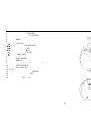
Description 1. 2. 3. 4. 5. 6. 7. 8. 9. 10. 11. 12. 13. 14. 15. 16. VOLUME knob FUNCTION switch Headphones socket DBBS button Cassette recorder buttons: PAUSE STOP/ EJECT Fast forward Fast rewind PLAY RECORD Disc compartment handle PROGRAM button PLAY MODE button Next track/ forward rewind ( /
- Страница 3 из 16
Important safeguards Attention: The owner’s manual contains important operating and maintenance instructions. For your safety, it is necessary to refer to the manual. Dangerous voltage: Uninsulated dangerous voltage that may be of sufficient magnitude to constitute a risk of electrical shock to
- Страница 4 из 16
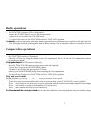
Radio operations Set FUNCTION switch to FM or AM position. Rotate the TUNING knob to receive the desired station. Adjust the level of sound with VOLUME knob. To turn off the radio, set the FUNCTION switch to TAPE (OFF) position. Antenna For FM reception, adjust the telescopic antenna appropriately
- Страница 5 из 16
Play Press mode the PLAY MODE button once for single track repeat playing. Press PLAY MODE twice for track inside the album repeat playing. Press PLAY MODE three times for all tracks repeat playing. Press PLAY MODE four times for playing randomly. To cancel repeat/random play, press PLAY MODE
- Страница 6 из 16
Cassette recorder operation Cassette Slide the playback FUNCTION switch to TAPE(OFF) position. Press the STOP/EJECT button to open the cassette compartment. Insert a cassette and push the cassette door to close the cassette compartment. The full tape reel should be on the right side. Press the PLAY
- Страница 7 из 16
recording. This deck is not suitable for recording on CHROME (IEC II) or METAL (IEV IV) type cassettes. For recording use NORMAL type cassette (IEC I) on which the tabs have not been broken. At the very beginning and end of the tape, no recording will take place during the 7 seconds, when the
- Страница 8 из 16
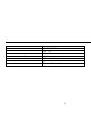
Specification CD playback format CD types Power supply Output power, RMS FM range AM range Net / Gross weight Gift box dimension (L x W x H) MP3 CD/CD-R/CD-RW 220 V, 50 Hz 1.5 W x 2 64-108 MHz 522 kHz - 1620 kHz 2.5 kg / 318 mm x 255 mm x 168 mm Specifications and functions are subject to change
- Страница 9 из 16
1. 2. 3. 4. 5. VOLUME FUNCTION DBBS : (PAUSE) / 6. 7. 8. 9. 10. 11. 12. LCD 13. 14. 15. 16. (STOP/EJECT) (FF) (RW) (PLAY) (RECORD) PLAY MODE REPEAT ( / STOP/FOLDER PLAY/PAUSE ) ( / ) / TUNING FM 220 ~ 50 10
- Страница 10 из 16
: . . : . , . : . . . 8 R-14 UM-2 C, , . . , , , . . . : , . . , . 3,5 . . 11 .
- Страница 11 из 16
FUNCTION TUNING, VOLUME , FM , A FM AM. . . TAPE (OFF). FUNCTION , . , . CD FUNCTION CD. , . , , . / PLAY/PAUSE. ( ) STOP/FOLDER. , PLAY/PAUSE. . STOP/FOLDER . FUNCTION CD TAPE (OFF). / / PLAY/PAUSE . . , , . . . / , . . , / 12 .
- Страница 12 из 16
(PLAY MODE) PLAY MODE. PLAY MODE PLAY MODE PLAY MODE . . . PLAY MODE . , . 20 20 . STOP/FOLDER. PROGRAM. / . PROGRAM , , : . . PLAY/PAUSE. : CD PLAY/PAUSE, STOP/FOLDER. : CD-R/CD-RW . MP3 CD. , , . MP3 , . MP3- , STOP/FOLDER .( CD- . . PLAY/PAUSE, ). : 3 13 .
- Страница 13 из 16
FUNCTION (OFF). STOP/EJECT. . . PLAY. PAUSE. . STOP/EJECT. . . : . , . , STOP/EJECT . : . RECORD. FUNCTION TUNING, . . PAUSE. STOP/EJECT. FM . AM. . . CD RECORD. FUNCTION . , . PAUSE. STOP/EJECT, CD. . . , : 14 STOP/FOLDER.
- Страница 14 из 16
CHROME (IEC II) (IEC I) . METAL (IEC IV). . NORMAL . 7 , . . “Dynamic BASS Boost” , «DBBS». . . , , . . , , , . . . . 50 . . PLAY, PAUSE, . ( ) ( ) . . . , , . , , 15 , .
- Страница 15 из 16
, . , , . FM M / ( x x ) 3 CD/CD-R/CD-RW 220 , 50 1,5 2 64-108 522 - 1620 2,5 / 318 x 255 x 168 . 16 .
- Страница 16 из 16