Инструкция для Hyundai H-1203, Electronics H-1203
 1
 2
 3
 4
 5
 6
 7
 8
 9
 10
 11
 12
 13

4
-Recording from built-in Condenser Microphone
SOUND ADJUSTMENT
VOLUME
The level of sound reproduced by the loudspeaker or Stereo Headphones is adjusted by the VOLUME control.
NOTE:
During recording, adjusting the VOLUME control only affects the monitor sound and not the content of recording.
RADIO OPERATION
OPERATION
·
Set Function switch to RADIO position thus the Power LED indicator should light up.
·
Select your desired broadcasting band with Band switch.
·
Rotate the Tuning control regulator to receive the desired broadcast.
·
Adjust the level and quality of sound with Volume control switch.
·
To turn off the radio, set the Function switch to TAPE position.
ANTENNA
·
For FM reception, adjust the telescopic antenna appropriately to obtain the best reception on the band selected.
·
The AM signals are picked up through the built-in ferrite antenna. The set should be placed to a position for the best reception.
CAUTION:
·
Do not connect FM antenna to an external antenna.
FM AND FM STEREO RECEPTION
·
Set Band switch FM position, programmer is received in mono mode.
NOTE:
In particular when stereo signal is weak and much noise are received, it is preferable to receive the programmer in mono.
·
Set FM Mode switch to FM STEREO position, programmer is received in stereo mode, thus FM STEREO LED should light up.
Оглавление инструкции
- Страница 1 из 14
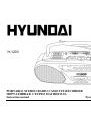
H-1203 PORTABLE STEREO RADIO CASSETTE RECORDER Instruction manual
- Страница 2 из 14
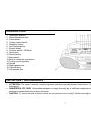
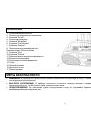
DESCRIPTION 1. Telescopic antenna 2. Stereo headphone jack 3. Pause button 4. Volume control switch 5. Stop/Eject button 6. Fast forward button 7. Rewind button 8. Function switch / FM Mode 9. Play button 10. Record button 11. Band switch 12. Built-in condenser microphone 13. Tuning control
- Страница 3 из 14
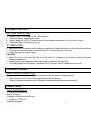
POWER SUPPLY BATTERY OPERATION · · · · Set the FUNCTION switch to the TAPE position. Open the battery compartment cover. Insert 6 batteries (UM-1). Please observe correct battery polarities or the set will not work. Close the battery compartment cover. AC OPERATION · Before the first connecting of
- Страница 4 из 14
-Recording from built-in Condenser Microphone SOUND ADJUSTMENT VOLUME The level of sound reproduced by the loudspeaker or Stereo Headphones is adjusted by the VOLUME control. NOTE: During recording, adjusting the VOLUME control only affects the monitor sound and not the content of recording. RADIO
- Страница 5 из 14
CASSETTE RECORDER OPERATION CONTROLS · STOP/EJECT button During operation, depress to stop all deck operation. Press again to open the cassette door. · FAST FORWARD button and REWIND button Press to rapidly advance the tape in either forward or reverse direction. · PLAY button Press to start
- Страница 6 из 14
NOTE: · You may want to monitor playback during recording. You can adjust the sound with the VOLUME control. This adjustment does not affect the content of recording RECORDING WITH BUILT-IN MICROPHONE · Slide the Function switch to TAPE position thus the Power LED indicator should light up. ·
- Страница 7 из 14
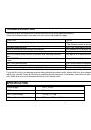
TROUBLESHOOTING Carefully re-read the instructions to make sure the unit is being operated properly. Check the following before you take your unit to the local dealer for repair. SYMPTOM There is no sound from the speakers. CAUSE - Headphones are connected to the unit. - The Volume control is set
- Страница 8 из 14
1. 2. 3. 4. 5. 6. 7. 8. 9. 10. 11. 12. 13. 14. 15. 16. 17. · Pause Stop/Eject Fast forward Rewind / FM mono/stereo Play Record : . . · · : . , . : . . 8
- Страница 9 из 14
· · · · TAPE. . 6 UM-1, , . . · , , , . · · . . : · , . . · · , . , . · · · 3,5 . . · RADIO: · TAPE: 9 .
- Страница 10 из 14
, , . : , . · · · · · RADIO, . , . , . . . · FM , , . · AM , . : · FM · FM . FM FM. : · (FM). FM STEREO, , FM STEREO. 10
- Страница 11 из 14
· · · · · · Record Play Fast forward Rewind Stop/Eject Pause - · · · , STOP/EJECT. PLAY. . . : · · PAUSE. STOP/EJECT. . · · . . · · RADIO, . . , · · · . . RECORD STOP/EJECT PLAY. : · , 11
- Страница 12 из 14
· · · · TAPE, . . RECORD PLAY STOP/EJECT . : , · . , . , . · · · . , , , . . . · · · . . , . , , , , . , . 12
- Страница 13 из 14
, , , . . . - . . TAPE FM . , . PLAY , . , RECORD . PAUSE. . . . . , . . , . , . 230 , 50 RMS 2 / 1,66 / 1,75 395 x 147 ( x x ) 2 x 156 13 .
- Страница 14 из 14