Инструкция для Hyundai Electronics H-1415, H-1415
 1
 2
 3
 4
 5
 6
 7
 8
 9
 10
 11
 12
 13
 14

3
Important safeguards
·
ATTENTION:
The owner s manual contains important operating and maintenance instructions. For your safety, it is necessary to refer to the manual.
·
DANGEROUS VOLTAGE:
Uninsulated dangerous voltage that may be of sufficient magnitude to constitute a risk of electrical shock to persons is
present within this product enclosure.
·
CAUTION
: To reduce the risk of electric shock, do not remove cover (or back). Prefer servicing to qualified service personnel.
Power supply
Battery operation
·
Open the battery compartment cover.
·
Insert 8 x 1.5V UM-2 R14
size. Please observe correct battery polarities or the set will not work.
·
Close the battery compartment cover.
AC operation
·
Before the first connecting of the appliance check that voltage indicated on the rating label corresponds the mains voltage in your home.
·
Plug the corresponding end of cord into the AC socket on the rear of the set.
·
Insert the plug into power supply.
CAUTION:
·
When the set is only used with AC or is not used for 2 weeks or more, please remove the batteries, to avoid damage to the set from leakage of batteries.
·
Always switch off the unit when not in use.
·
Always unplug the appliance from power supply, when no use long time.
Stereo headphone connecting
·
For private listening, insert 3.5 mm headphone into the stereo headphone jack.
·
Adjust volume control to the appropriate level as desired.
·
When the stereo headphone jack is plugged, speaker will disconnect automatically.
Radio operation
·
Set FUNCTION switch to RADIO position.
·
Select your desired broadcasting band with BAND switch.
·
Rotate the TUNING control regulator to receive the desired broadcast.
·
Adjust the level of sound with VOLUME control regulator.
·
To turn off the radio, set the FUNCTION switch to OFF position.
Оглавление инструкции
- Страница 1 из 15
H-1415 CD/MP3 RADIO PLAYER Instruction manual CD/MP3
- Страница 2 из 15
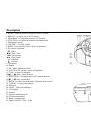
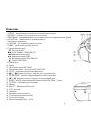
Description 1. INTRO - plays the initial 10 seconds of every CD track 2. REPEAT - to repeat one or all CD tracks 3. PROGRAM - to program a sequence of CD tracks 4. FUNCTION - to choose the requested operating mode 5. Head phones socket 6. VOLUME - to set the volume 7. DBBS - to increase the level
- Страница 3 из 15
Important safeguards · · · ATTENTION: The owner s manual contains important operating and maintenance instructions. For your safety, it is necessary to refer to the manual. DANGEROUS VOLTAGE: Uninsulated dangerous voltage that may be of sufficient magnitude to constitute a risk of electrical shock
- Страница 4 из 15
Antenna · · · For FM reception, adjust the telescopic antenna appropriately to obtain the best reception on the band selected. The AM signal is picked up through the built-in ferrite antenna. The set should be placed to a position for the best reception. When receiving FM Stereo transmission, the
- Страница 5 из 15
· Press the PROG button. PROG symbol is flashing on the display. or buttons. · Select a desired track by using the · Press PROG button to confirm. P02 on the display shows you that you now may store track2. · Repeat steps described above to enter additional memories into the program if necessary. ·
- Страница 6 из 15
Cassette recorder operation Cassette playback · · · · · · · · Slide the FUNCTION switch to TAPE position. Press the STOP/EJECT button to open the cassette compartment. Insert a cassette with tape open upwards and push the cassette door to close the cassette compartment. The full tape reel should be
- Страница 7 из 15
· · · This deck is not suitable for recording on CHROME (IEC II) or METAL (IEV IV) type cassettes. For recording use NORMAL type cassette (IEC I) on which the tabs have not been broken. At the very beginning and end of the tape, no recording will take place during the 7 seconds, when the leader
- Страница 8 из 15
1. INTRO 10 2. REPEAT 3. PROGRAM 4. FUNCTION 5. 6. VOLUME 7. DBBS 8. : (PAUSE) / (STOP/EJECT) (FF) (RW) (PLAYBACK) (RECORD) 9. USB 10. 11. SD / MMC 12. / PLAY/PAUSE 13. STOP / 14. 15. PUSH OPEN 16. / 17. BAND 18. TUNING 19. 20. FM ST. FM 21. LCD 22. 23. 24. FM 25. 26. 230 ~ 50 FM - 8
- Страница 9 из 15
· : . . · · : . , . : . . · · · 8 R-14 . UM-2 . C, , · , , , · · · . . . . : , , , . . · , . · · · · · 3,5 . . RADIO. , . 9 .
- Страница 10 из 15
· · · , . . OFF. , · · · FM , , A FM FM , . . . , , FM mono. CD · · · CD/USB/SD. PUCH OPEN . . , · · · · · · , , . PLAY/PAUSE. PLAY/PAUSE. , STOP. . . STOP . TAPE (OFF). CD . · · PLAY . , , . · · . . 1 2 . . , , . · REPEAT. 10 REPEAT .
- Страница 11 из 15
· · REPEAT . REPEAT ALL . REPEAT. · , . 32 · · · 32 PROGRAM. PROG . STOP. . . PROGRAM . P02 , , . · · , , . PLAY/PAUSE. : · : - CD STOP . : CDR/CDRW INTRO, 10 . . MP3 · · , CD/USB/SD. PUCH OPEN . 3 , . · MP3- , CD- : 3 USB / SD-MMC · · · · . USB PLAY/PAUSE USB SD/MMC CD/USB/SD. 2 . . USB SD/MMC 11
- Страница 12 из 15
· · · · PLAY/PAUSE . . , . STOP. : USB SD/MMC . · · . STOP/EJECT. . . · · · · · PLAY. PAUSE. . STOP/EJECT. . . : . , . , . · · · · . . RADIO. . , . . PLAY, RECORD. PLAY , · · · STOP . PAUSE, . CD CD. . , , . 12 PLAY
- Страница 13 из 15
· PLAY, RECORD. , · PLAY . PAUSE, . STOP/EJECT, , , STOP. : · · . CHROME (IEC II) NORMAL (IEC I) . METAL (IEC IV). . 7 · , . . · Dynamic BASS Boost · , . «DBBS». · . , , . · · . , , , . · . . · · · . . , . , , , , . · PLAY , . , , . 13 .
- Страница 14 из 15
220 , 50 4 / ( x x ) 2 2,35 / 2,8 370 x 267 x 168 . 14
- Страница 15 из 15