Инструкция для Hyundai Electronics H-1415, H-1415
 1
 2
 3
 4
 5
 6
 7
 8
 9
 10
 11
 12
 13
 14
4
Antenna
·
For FM reception, adjust the telescopic antenna appropriately to obtain the best reception on the band selected.
·
The AM signal is picked up through the built-in ferrite antenna. The set should be placed to a position for the best reception.
·
When receiving FM Stereo transmission, the FM ST indication is activated. For MONO transmission or weak, noisy reception, put the BAND switch into
FM position to improve the sound quality.
Compact disc operation
·
Set FUNCTION switch to CD/USB/SD position.
·
Open the CD door by pressing on the PUSH OPEN field. Put a CD into the CD compartment with the label side upwards and close the CD door.
Display shows the total number of tracks.
Play/pause mode
·
Press the PLAY/PAUSE button to start play.
·
Press the PLAY/PAUSE button to pause at any track when playing.
·
To stop the CD, press the STOP button. Display shows the total number of tracks.
·
To remove the CD from the unit open the CD door.
·
Always press STOP button before opening the CD compartment.
·
To turn off the CD player set FUNCTION switch to TAPE (OFF) position.
Skip and search mode
During playback you can use
or
to select a particular track.
·
If you have selected a track number in the stop or pause position, press to start playback.
·
Press
once briefly for the next track, or press repeatedly until the desired track number appears in the display.
·
Press
once briefly to return to the beginning of a current track.
·
Press
more than once briefly for a previous track.
Finding a passage within a track
1 Press and hold down
or
. The CD is played at high speed and low volume.
2 When you recognize the passage you want release
or
. Normal playback resumes.
Repeat mode
·
Press the REPEAT button once for single track repeat playing. REPEAT symbol will be indicated on the display.
·
Press twice for all track repeat playing. REPEAT ALL symbol will be indicated on the display.
·
To cancel repeat play, press REPEAT button until the repeat indicator turn off.
Program mode
·
Up to 32 tracks can be programmed for disc play in any order or the same track can be repeated up to 32 times. Before use, press the STOP button.
Оглавление инструкции
- Страница 1 из 15
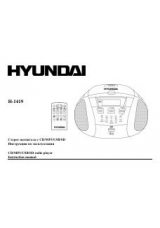
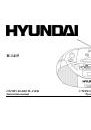
H-1415 CD/MP3 RADIO PLAYER Instruction manual CD/MP3
- Страница 2 из 15
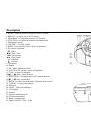
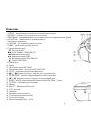
Description 1. INTRO - plays the initial 10 seconds of every CD track 2. REPEAT - to repeat one or all CD tracks 3. PROGRAM - to program a sequence of CD tracks 4. FUNCTION - to choose the requested operating mode 5. Head phones socket 6. VOLUME - to set the volume 7. DBBS - to increase the level
- Страница 3 из 15
Important safeguards · · · ATTENTION: The owner s manual contains important operating and maintenance instructions. For your safety, it is necessary to refer to the manual. DANGEROUS VOLTAGE: Uninsulated dangerous voltage that may be of sufficient magnitude to constitute a risk of electrical shock
- Страница 4 из 15
Antenna · · · For FM reception, adjust the telescopic antenna appropriately to obtain the best reception on the band selected. The AM signal is picked up through the built-in ferrite antenna. The set should be placed to a position for the best reception. When receiving FM Stereo transmission, the
- Страница 5 из 15
· Press the PROG button. PROG symbol is flashing on the display. or buttons. · Select a desired track by using the · Press PROG button to confirm. P02 on the display shows you that you now may store track2. · Repeat steps described above to enter additional memories into the program if necessary. ·
- Страница 6 из 15
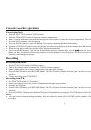
Cassette recorder operation Cassette playback · · · · · · · · Slide the FUNCTION switch to TAPE position. Press the STOP/EJECT button to open the cassette compartment. Insert a cassette with tape open upwards and push the cassette door to close the cassette compartment. The full tape reel should be
- Страница 7 из 15
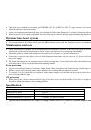
· · · This deck is not suitable for recording on CHROME (IEC II) or METAL (IEV IV) type cassettes. For recording use NORMAL type cassette (IEC I) on which the tabs have not been broken. At the very beginning and end of the tape, no recording will take place during the 7 seconds, when the leader
- Страница 8 из 15
1. INTRO 10 2. REPEAT 3. PROGRAM 4. FUNCTION 5. 6. VOLUME 7. DBBS 8. : (PAUSE) / (STOP/EJECT) (FF) (RW) (PLAYBACK) (RECORD) 9. USB 10. 11. SD / MMC 12. / PLAY/PAUSE 13. STOP / 14. 15. PUSH OPEN 16. / 17. BAND 18. TUNING 19. 20. FM ST. FM 21. LCD 22. 23. 24. FM 25. 26. 230 ~ 50 FM - 8
- Страница 9 из 15
· : . . · · : . , . : . . · · · 8 R-14 . UM-2 . C, , · , , , · · · . . . . : , , , . . · , . · · · · · 3,5 . . RADIO. , . 9 .
- Страница 10 из 15
· · · , . . OFF. , · · · FM , , A FM FM , . . . , , FM mono. CD · · · CD/USB/SD. PUCH OPEN . . , · · · · · · , , . PLAY/PAUSE. PLAY/PAUSE. , STOP. . . STOP . TAPE (OFF). CD . · · PLAY . , , . · · . . 1 2 . . , , . · REPEAT. 10 REPEAT .
- Страница 11 из 15
· · REPEAT . REPEAT ALL . REPEAT. · , . 32 · · · 32 PROGRAM. PROG . STOP. . . PROGRAM . P02 , , . · · , , . PLAY/PAUSE. : · : - CD STOP . : CDR/CDRW INTRO, 10 . . MP3 · · , CD/USB/SD. PUCH OPEN . 3 , . · MP3- , CD- : 3 USB / SD-MMC · · · · . USB PLAY/PAUSE USB SD/MMC CD/USB/SD. 2 . . USB SD/MMC 11
- Страница 12 из 15
· · · · PLAY/PAUSE . . , . STOP. : USB SD/MMC . · · . STOP/EJECT. . . · · · · · PLAY. PAUSE. . STOP/EJECT. . . : . , . , . · · · · . . RADIO. . , . . PLAY, RECORD. PLAY , · · · STOP . PAUSE, . CD CD. . , , . 12 PLAY
- Страница 13 из 15
· PLAY, RECORD. , · PLAY . PAUSE, . STOP/EJECT, , , STOP. : · · . CHROME (IEC II) NORMAL (IEC I) . METAL (IEC IV). . 7 · , . . · Dynamic BASS Boost · , . «DBBS». · . , , . · · . , , , . · . . · · · . . , . , , , , . · PLAY , . , , . 13 .
- Страница 14 из 15
220 , 50 4 / ( x x ) 2 2,35 / 2,8 370 x 267 x 168 . 14
- Страница 15 из 15