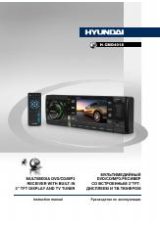
Инструкция для Hyundai H-PS1203B
 1
 2
 3
 4
 5
 6
 7
 8
 9
 10
 11
 12
 13
 14
 15
 16
 17
 18
 19
 20
7
Instruction manual
control playback with the buttons of this unit
except adjusting the volume.
Volume
Rotate VOL regulator to adjust the sound
volume level.
Radio operation
• Radio is only available when no USB,
memory card or external audio source is
connected.
• Press shortly / button to start
automatic search and saving of all available
stations in the memory. The frequency and
the memory position number will flash on the
display. The device can hold in memory up to
40 stations.
• To select saved stations press
/
buttons repeatedly.
• To tune the radio manually press and
hold SET button and search using the
volume regulator. To save the station press
and hold
button. The memory position
number will flash on the display. Press and
hold
button to confirm.
• To switch off the radio, press MODE
button.
Bluetooth operation
Press and hold M button to enter bluetooth
mode. Switch on bluetooth on your external
device and select H-PS1203B. Now you can
listen to music from your player/cellphone
through the unit.
USB/SD operation
Connecting USB/SD
• Insert a USB device into the USB port or
insert a memory card into the memory card
slot. Press M button to enable USB or SD
mode. The unit will start reading the device.
The playback will start automatically.
Playback operations
• During playback press
/
buttons
to choose audiofile. Press / button to
play/pause.
• During playback press and hold M
button to enable BASS EQ mode.
• To adjust volume, turn the volume
regulator.
General USB/SD notes
• This unit is equipped with a USB
socket that can accept and play MP3/WMA/
WAV files stored on standard USB flash
(compatible with USB version 2.0) up to 32
Gb.
• This unit is also equipped with an SD
card socket that can accept and play MP3/
WMA/WAV files stored on standard micro SD
cards up to 32 Gb.
Always switch off the unit or change
mode to another one before removing a USB
flash drive or SD card, to prevent damage to
your USB device or memory card.
Note: Although this product is fully
compatible with USB 2.0 and micro SD card
standard formats, a small percentage of USB
flash drives and micro SD cards might not be
readable, due to those device manufacturers’
non-compliance with the full (official) USB
and micro SD card standards.
• FAT32 file system is supported by USB
Оглавление инструкции
- Страница 1 из 21
H-PS1203B ПОРТАТИВНАЯ АУДИОСИСТЕМА С BLUETOOTH PORTABLE AUDIO SYSTEM WITH BLUETOOTH Руководство по эксплуатации Instruction manual
- Страница 2 из 21
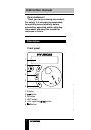
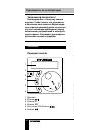
Instruction manual Dear customer! Thank you for purchasing our product. For safety, it is strongly recommended to read this manual carefully before connecting, operating and/or adjusting the product and keep the manual for reference in future. Description 1 Front panel 1 2 3 4 5 6 1. Display 2.
- Страница 3 из 21
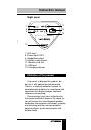
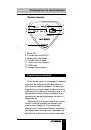
Instruction manual Right panel 7 8 9 11 12 13 10 7. AUX input 8. Power input DC5V 9. Headphone output 10. Battery compartment 11. Memory card slot 12. USB port 13. Charging indicator Utilization of the product If you want to dispose this product, do not mix it with general household waste. There is
- Страница 4 из 21
Instruction manual Important safeguards • The instruction manual contains important operating and maintenance instructions. For your safety, it is necessary to refer the manual. Keep the manual for use in future. • Do not hit or drop the unit. • Do not expose the unit to vibration, direct sunlight,
- Страница 5 из 21
Instruction manual a consumable and its malfunction is not a warranty case. General operations Power on/off Press and hold / button to switch the unit on; the display will light up. To switch the unit off, press and hold this button again. Headphone socket For private listening please insert the
- Страница 6 из 21
Instruction manual control playback with the buttons of this unit except adjusting the volume. Volume Rotate VOL regulator to adjust the sound volume level. Radio operation • Radio is only available when no USB, memory card or external audio source is connected. • Press shortly / button to start
- Страница 7 из 21
Instruction manual USB/SD operation Connecting USB/SD • Insert a USB device into the USB port or insert a memory card into the memory card slot. Press M button to enable USB or SD mode. The unit will start reading the device. The playback will start automatically. Playback operations • During
- Страница 8 из 21
Instruction manual and SD of this unit. According to the USB 1.1/2.0 Standard, usage of a USB device with power current consumption exceeding 500 mA is not recommended without supplementary power supply. Failure to use supplementary power for connected USB drives with power consumption exceeding
- Страница 9 из 21
Instruction manual Specifications FM frequency range Supported storages Lithium-ion battery Bluetooth profile Nominal power consumption Net/Gross weight Unit dimensions 87.5 - 108 MHz USB/micro SD 3.7 V / 1800 mAh 2.0 + EDR 2 x 2W 0.47 kg/0.68 kg 290 x 72 x 70 mm Specifications and functions are
- Страница 10 из 21
Руководство по эксплуатации Уважаемый покупатель! Благодарим Вас за покупку нашего изделия. Чтобы понять, как правильно и безопасно пользоваться Вашей моделью изделия, рекомендуется тщательно изучить настоящее руководство перед включением, регулировкой и эксплуатацией изделия. Сохраняйте
- Страница 11 из 21
Руководство по эксплуатации Правая панель 7 8 9 11 12 13 10 7. Вход AUX 8. Разъем питания DC5V 9. Выход для нашников 10. Отсек для батарей 11. Слот для карт памяти 12. USB-порт 13. Индикатор зарядки Утилизация изделия Если вы желаете утилизировать данное изделие, не выбрасывайте его вместе с
- Страница 12 из 21
Руководство по эксплуатации работке и, таким образом, предотвратите потенциальное негативное воздействие на окружающую среду и здоровье людей. Меры безопасности • В руководстве присутствуют важные указания по эксплуатации и уходу. Перед использованием устройства ознакомьтесь с руководством и
- Страница 13 из 21
Руководство по эксплуатации мулятора типа 18650, 1800 мА/ч (в комплекте) либо путем подключения разъема питания данного устройства к источнику питания (напр. ПК) с помощью входящего в комплект кабеля MiniUSB-USB. Установка аккумулятора Чтобы установить аккумулятор, снимите крышку аккумуляторного
- Страница 14 из 21
Руководство по эксплуатации передаваться через встроенный динамик устройства). Часы Нажмите кратко кнопку / , когда устройство выключено. Когда на дисплее отобразатся часы, нажмите и удерживайте кнопку SET; цифры, означающие часы, будут мигать. Нажимайте кнопки / , чтобы выставить часы. Нажмите
- Страница 15 из 21
Руководство по эксплуатации Операции с радио • Радио доступно только если к устройству не подсоединен USB-накопитель, карта памяти или внешний источник аудио. • Нажмите кратко кнопку / для запуска автоматического поиска и сохранения всех доступных радиостанций в памяти. На дисплее будет
- Страница 16 из 21
Руководство по эксплуатации слот для карты памяти. Нажмите кнопку M для активации режима USB или SD. Устройство начнет поиск и считывание подсоединенного носителя. Воспроизведение начнётся автоматически. Воспроизведение • Во время воспроизведения нажимайте на кнопки и , чтобы выбрать нужную
- Страница 17 из 21
Руководство по эксплуатации ся файловая система FAT32. Согласно стандарту USB 1.1/2.0 использование USB-устройства с током потребления более 500 мА не рекомендуется без использования дополнительного источника питания. Подключение без дополнительного питания USB-носителей, потребляющих ток, который
- Страница 18 из 21
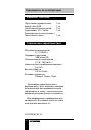
Руководство по эксплуатации Комплект поставки Портативная аудиосистема Кабель mini-USB Литий-ионный аккумулятор Аудиокабель 3.5 - 3.5мм Руководство по эксплуатации + Гарантийный талон 1 шт 1 шт 1 шт 1 шт 1 шт Технические характеристики FM-диапазон радиочастот 87 - 108 MГц Поддержка носителей
- Страница 19 из 21
Руководство по эксплуатации 19
- Страница 20 из 21
20
- Страница 21 из 21