Инструкция для Hyundai H-LCDVD713
 1
 2
 3
 4
 5
 6
 7
 8
 9
 10
 11
 12
 13
 14
 15
 16
 17
 18
 19
 20
 21
 22
 23
 24
 25
 26
 27
 28
 29
2
3
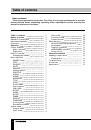
Table of contents
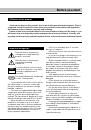
Before you start
If you want to dispose this product, do not mix it with general household waste. There is
a separate collection system for used electronic products in accordance with legislation
that requires proper treatment, recovery and recycling.
Please contact your local authorities for the correct method of disposal. By doing so, you
will ensure that your disposed product undergoes the necessary treatment, recovery and
recycling and thus prevent potential negative effects on the environment and human health.
Utilization of the product
Important safeguards
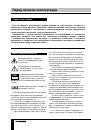
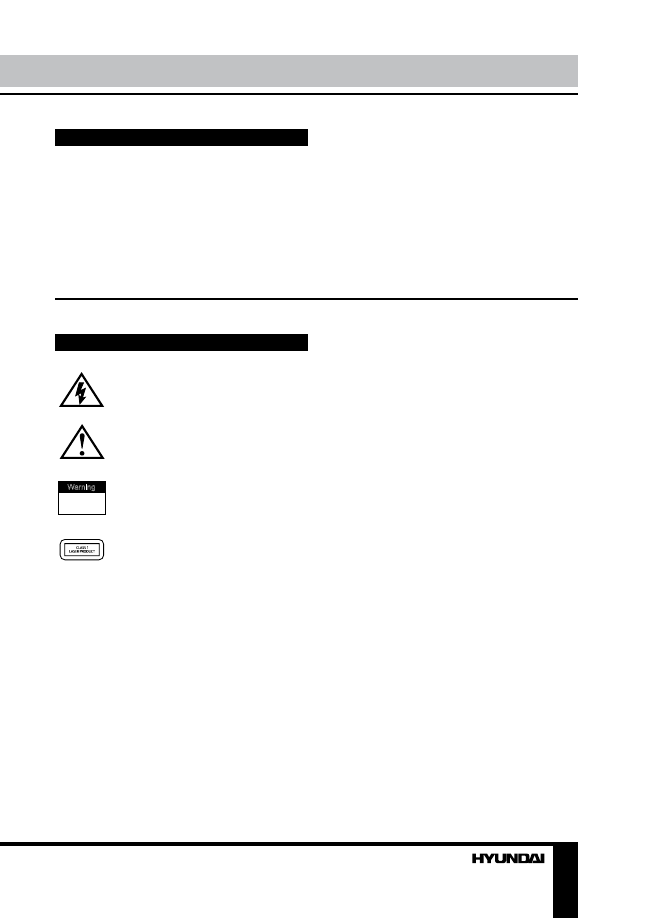
Alerts the user to the presence
of dangerous voltage within the
product’s enclosure.
Alerts the user to the presence
of important operating
instructions.
To reduce the risk of electric shock
or fire, do not open the cover. Refer
servicing to qualified service
personnel.
This mark indicates this unit belongs
to class 1 laser product.
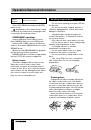
• To prevent the risk of fire or electric shock,
don’t allow water to come into contact with
the device and don’t use the device in high
humidity conditions.
• The device is equipped with high voltage
components and a laser system, hence you
shall not open the device and repair it by
yourself. The laser beam is dangerous to eyes
when the housing is removed. Don’t look at it.
• When the device is moved from cold
premises to the warm room or vice versa,
condensate may form on the laser head and
the device may not operate properly. In this
case please turn the device on for 1-2 hours
without disc before playback to heat it to a
proper operation temperature.
• Don’t try to manually open or close the
disc tray to load discs.
• Disconnect the receiver only when there is
no disc therein.
• If you are not going to use the device for a
long time disconnect it from the wall outlet.
• Before turning the device on, please make
sure that you have connected it properly,
adjust the volume of speakers and amplifiers
of your radio system to the minimum. Adjust
the volume as necessary only after normal
playback has started to avoid damage of your
audio system.
• Use supply sources of rated voltage,
otherwise the unit may not function or may be
damaged.
• Place the unit on a horizontal surface.
Keep the unit ventilated. Don’t block the heat
hole. Overheat may cause malfunction.
• Do not place any objects on the player’s
cover, this may make it function improperly
(incorrect playback).
• Please place the device in a dry and
well-aired area. Do not place it near heating
units or expose it to direct sunlight, mechanical
vibration, humidity or excessive dust.
• If using power plug and appliance coupler
as a cutting-connecting device, it should be
operated easily.
• Never use liquid detergents, abrasives or
organic compounds (alcohol, gasoline, etc) to
clean the unit body.
Warning
RISK OF ELECTRIC SHOCK
DO NOT OPEN
Оглавление инструкции
- Страница 1 из 30
H-LCDVD713 PORTABLE DVD PLAYER WITH 7” LCD DISPLAY Instruction manual ПОРТАТИВНЫЙ DVDПРОИГРЫВАТЕЛЬ С 7” LED-ДИСПЛЕЕМ Руководство по эксплуатации
- Страница 2 из 30
Table of contents Dear customer! Thank you for purchasing our product. For safety, it is strongly recommended to read this manual carefully before connecting, operating and/or adjusting the product and keep the manual for reference in the future. Table of contents Before you start Utilization of
- Страница 3 из 30
Before you start Utilization of the product If you want to dispose this product, do not mix it with general household waste. There is a separate collection system for used electronic products in accordance with legislation that requires proper treatment, recovery and recycling. Please contact your
- Страница 4 из 30
Before you start • All repairs and technical service should be made by qualified specialist from service centers. All images provided herein are schematic drawings of real objects and may differ from their real images. Connection Before you start connection of external devices, ensure that power of
- Страница 5 из 30
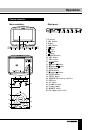
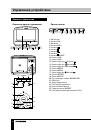
Operation Control elements Main controllers Right panel 20 1 2 7 10 3 4 8 5 6 9 16 11 21 22 23 24 25 26 1. IR sensor 2. VOL- button 3. Display 4. VOL+ button 5. button 6. button 7. button 8. button 9. SOURCE button 10. VOL- button 11. VOL+ button 12. / button 13. button/ button 14. button/ button
- Страница 6 из 30
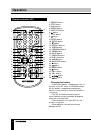
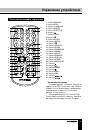
Operation Remote controller (RC) 1 16 2 17 3 18 4 19 5 20 6 21 7 22 23 8 9 10 11 24 25 26 12 13 27 14 15 28 1. SEARCH button 2. STEP button 3. Digit buttons 4. ANGLE button 5. SUBTITLE button 6. button 7. TITLE button 8. button 9. ENTER button 10. SETUP button 11. button 12. REPEAT buttons 13. SLOW
- Страница 7 из 30
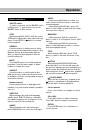
Operation Button functions ON/OFF switch To switch on the unit, set the ON/OFF switch to ON position. To turn off the power set the ON/OFF switch to OFF position. STEP When playing DVD, SVCD, VCD disc, press STEP button repeatedly to play video frame by frame. Press ENTER or button to resume normal
- Страница 8 из 30
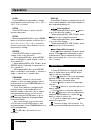
Operation SLOW Press SLOW button repeatedly to change slow playback speed as follows: 1/2 => 1/4 => 1/8 => 1/16 => normal. DISPLAY Press DISPLAY button to display various info on the current playback: title/chapter number or time elapsed/remaining, etc. SETUP Press SETUP button to enter or exit the
- Страница 9 из 30
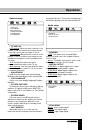
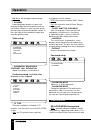
Operation General setup GENERAL SETUP PAGE TV DISPLAY ANGLE MARK OSD LANGUAGE CLOSED CAPTIONS SCREEN SAVER LAST MEMORY • TV DISPLAY 4:3 PanScan: When the unit connects to the normal TV set, the wide-screen image shows on the full screen, but some part is cut off. 4:3 LetterBox: When the unit
- Страница 10 из 30
Operation Mix-Mono: left and right output average signal. • DYNAMIC If watching large dynamic scope movie program at night, by selecting this mode you can reduce volume to a very low level and at the same time keep the fine details sounds. In this case, this doesn’t disturb the family and keep the
- Страница 11 из 30
Operation 600 minutes of music (170 songs). And the quality of MP3 disc approximates to an audio CD disc quality. JPEG (Joint Photographic Expert Group) image compression algorithm, used all over the world and providing high level of compression of the source data. Any graphics editor may edit
- Страница 12 из 30
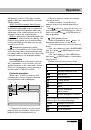
Operation/General information Cursor buttons Move zoom center Select EXIT MENU item and press ENTER button to exit. Depending on file volume and encoding, some delay is possible when changing modes or passing to the next menu item. USB/SD/MMC operations Insert a USB drive in the USB port, then
- Страница 13 из 30
General information Troubleshooting Below is a table describing simple measures that can help you eliminate most problems likely to emerge when this unit is in use. If below measures do not help, turn to a service center or to the nearest dealer. Symptom No sound No image Disc cannot be read Remote
- Страница 14 из 30
General information Specifications Appearance Unit dimensions Gift Box dimensions Net/Gross weight Display Display format Compatibility Supports Formats of playback Audio Built-in Dolby Digital decoder Video Color system Connectors Audio-video out Earphone jack Coaxial out Functions Children lock
- Страница 15 из 30
Содержание Уважаемый покупатель! Благодарим Вас за покупку нашего изделия. Чтобы понять, как правильно и безопасно пользоваться приобретенным устройством, рекомендуется тщательно изучить настоящее руководство перед подключением и эксплуатацией изделия. Сохраняйте руководство для использования в
- Страница 16 из 30
Перед началом эксплуатации Утилизация изделия Если вы желаете утилизировать данное изделие, не выбрасывайте его вместе с обычным бытовым мусором. Существует отдельная система сбора использованных электронных изделий в соответствии с законодательством, которая предполагает соответствующее обращение,
- Страница 17 из 30
Перед началом эксплуатации ной некорректной работы устройства. • Устройство должно находиться в сухом и проветриваемом месте. Исключайте нахождение устройства вблизи нагревательных приборов, не подвергайте воздействию солнечного света, механической вибрации, влажности и пыли. • Не используйте для
- Страница 18 из 30
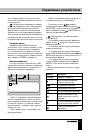
Управление устройством Элементы управления Основные органы управления Правая панель 20 1 2 7 10 3 4 8 5 6 9 16 11 12 13 17 18 14 15 18 19 21 22 23 24 25 26 1. ИК-датчик 2. Кнопка VOL3. Дисплей 4. Кнопка VOL+ 5. Кнопка 6. Кнопка 7. Кнопка 8. Кнопка 9. Кнопка SOURCE 10. Кнопка VOL11. Кнопка VOL+ 12.
- Страница 19 из 30
Управление устройством Пульт дистанционного управления 1 16 2 17 3 18 4 19 5 20 6 21 7 22 23 8 9 10 11 24 25 26 12 13 27 14 15 28 1. Кнопка SEARCH 2. Кнопка STEP 3. Кнопки с цифрами 4. Кнопка ANGLE 5. Кнопка SUBTITLE 6. Кнопка 7. Кнопка TITLE 8. Кнопка 9. Кнопка ENTER 10. Кнопка SETUP 11. Кнопка
- Страница 20 из 30
Управление устройством Функции кнопок Переключатель ON/OFF Для включения питания устройства установите переключатель ON/OFF на правой панели в положение ON. Чтобы отключить питание, установите переключатель в положение OFF. STEP При воспроизведении DVD, SVCD, VCD диска нажимайте кнопку STEP для
- Страница 21 из 30
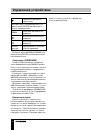
Управление устройством , чтобы начать воспроизведение. Во время воспроизведения нажмите эту кнопку для приостановки воспроизведения. Кнопки курсора Используйте кнопки курсора для перемещения по меню. VOL+/VOL- Нажимайте кнопки VOL+/VOL- для увеличения или уменьшения уровня громкости звука. ENTER
- Страница 22 из 30
Управление устройством предыдущему треку. • При воспроизведении DVD диска нажмите кнопку для перехода к следующей главе. • При воспроизведении SVCD, VCD, CD дисков нажмите кнопку для перехода к следующему треку. / (назад/вперед) Нажимайте кнопку для ускоренного воспроизведения назад. Нажимайте
- Страница 23 из 30
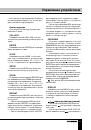
Управление устройством устройство включено и диск не воспроизводится в течение нескольких минут, то на экране появляется движущаяся заставка и через несколько минут устройство переходит в спящий режим. • Последняя память Если эта функция включена, устройство может запомнить время, на котором
- Страница 24 из 30
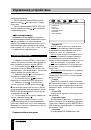
Управление устройством параметры в соответствии с вашими предпочтениями. Страница настройки предпочтений СТРАНИЦА ПРЕДПОЧТЕНИЙ Страница настройки пароля СТР. УСТАНОВКИ ПАРОЛЯ РЕЖИМ ПАРОЛЯ ПАРОЛЬ СИСТЕМА ТВ ЗВУК СУБТИТРЫ МЕНЮ ДИСКА ОГРАНИЧЕНИЕ ПО УМОЛЧАНИЮ • Система ТВ Данное устройство подходит для
- Страница 25 из 30
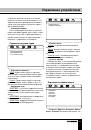
Управление устройством стью. Данный формат позволяет размещать полнометражные фильмы на одном компакт-диске. Производитель гарантирует нормальное воспроизведение только лицензионных дисков.Воспроизведение некоторых AVIфайлов может оказаться невозможным в зависимости от их конфигурации и параметров,
- Страница 26 из 30
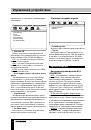
Управление устройством отражение картинки по горизонтали Выберите пункт ПРОДОЛЖЕНИЕ и нажмите кнопку ENTER для перехода ко второй странице меню: ZOOM изменение масштаба изображения увеличение масштаба изображения уменьшение масштаба изображения Кнопки курсора перемещение по увеличенному изображению
- Страница 27 из 30
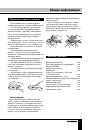
Общая информация Обращение с компакт-дисками • Не вставляйте в лоток для загрузки компакт-диска ничего, кроме компакт-диска. • Не используйте диски с трещинами, отколотыми краями, деформированные диски или диски с другими повреждениями, поскольку такие диски могут вызвать искажение звука, шумы или
- Страница 28 из 30
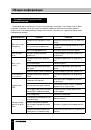
Общая информация Руководство по устранению неисправностей Ниже приводится таблица, в которой описаны простые меры, способные помочь Вам устранить большую часть проблем, могущих возникнуть при использовании данного устройства. Если нижеуказанные меры не помогли, обратитесь в сервисный центр или к
- Страница 29 из 30
Общая информация Технические характеристики Внешний вид Размеры устройства Размеры упаковки Вес нетто/брутто Дисплей Формат дисплея Совместимость с форматами Поддержка носителей Воспроизведение форматов Аудио Встроенный декодер Dolby Digital Видео Система цветности Терминалы Аудиовидеовыход Выход
- Страница 30 из 30