Инструкция для Hyundai H-CDM8063
 1
 2
 3
 4
 5
 6
 7
 8
 9
 10
 11
 12
 13
 14
 15
 16
 17
 18
 19
 20
 21
 22
 23
 24
 25
 26
 27
 28
 29
 30
 31
 32
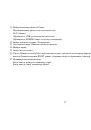 33
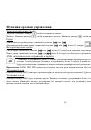 34
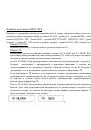 35
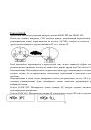 36
 37
 38
 39
 40
 41
 42
 43
 44
 45
 46
 47
 48
 49
 50
 51
 52
 53

39
RETUNE
RETUNE-S
RETUNE-L.
RETUNE-S
RETUNE-L –
TA SEEK.
RETUNE-S:
,
TA SEEK 45
.
RETUNE-L:
,
TA SEEK 180
.
:
RETUNE
TA
TA SEEK.
DSP
DSP=>POP=>ROCK=>CLASSIC=>FLAT=>DSP OFF
LOUD
.
ESP
.
ESP 12
:
12
CD-ESP,
MP3-ESP > 100
.
ESP 45
:
45
CD-Esp,
MP3-ESP > 100
.
MULT ON/OFF
/
(
:
CD-
,
.
:
,
,
).
BEEP ON/OFF
.
SEEK ½
1
2.
:
SEEK 1
.
,
.
Оглавление инструкции
- Страница 1 из 54
H-CDM8063 MP3/CD/CD-R/CD-RW/USB/SD/MMC RECEIVER MP3/CD/CD-R/CD-RW/USB/SD/MMC - Instruction manual
- Страница 2 из 54
Dear customer! Thank you for purchasing our product. For safety, it is strongly recommended to read this manual carefully before connecting, operating and / or adjusting the product and keep the manual for reference in the future. Table of contents Table of contents
- Страница 3 из 54
Important safeguards Read carefully through this manual to familiarize yourself with this high-quality sound system. Use only in a 12-volt DC negative-ground electrical system. Disconnect the vehicle's negative battery terminal while mounting and connecting the unit. When replacing the fuse, be
- Страница 4 из 54
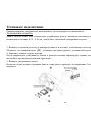
Installation/Connections First complete the electrical connections, and then check them for correctness. Installation opening This unit can be install in any dashboard having an opening as shown below. The dashboard should be 4.75 – 5.56 mm thick in order to be able to support the unit. 1. Insert
- Страница 5 из 54
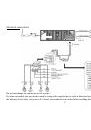
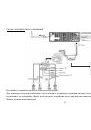
Electrical connections Do not interchange the connection of the wiring!!! For some car models you may need to modify wiring of the supplied power cord as illustrated (modified wiring), or else the memory of the unit may be lost after you power off. Contact your authorized car dealer before
- Страница 6 из 54
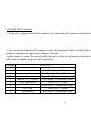
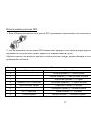
Using the ISO Connector 1. If your car is equipped with the ISO connector, then connect the ISO connectors as illustrated. 2. For connections without the ISO connectors, check the wiring in the vehicle carefully before connecting, incorrect connection may cause serious damage to this unit. Cut the
- Страница 7 из 54
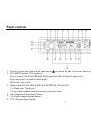
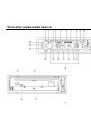
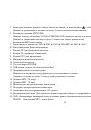
Panel controls 1. Power on: press any button on the panel except to turn on the unit. Press more than 2 seconds to power off. 2. SEL/MENU button/ VOL regulator. Press to select VOL/BAS/TRE/BAL/FAD, rotate the Multi-Control to adjust level. Press more than 2 seconds to Menu mode. MP3 track / file
- Страница 8 из 54
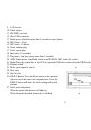
9. LCD screen. 10. Panel release. 11. SD/MMC card slot. 12. iPod, USB connector. 13. Radio preset. Hold for more than 2 seconds to store station. 14. MP3 track +10 up. 15. MP3 track –10 down. 16. Track random play. 17. Track repeat play. 18. Intro play (10 seconds). 19. Play/pause. Top play (press
- Страница 9 из 54
Control functions Disc load/eject Load: press Eject: Press to flip down the panel. Insert the disc into the slot. to flip down the panel. Press to eject the disc. Radio To fine tune the radio, press or briefly. To search the station automatically, press or for more than 0.5 second Disk playback
- Страница 10 из 54
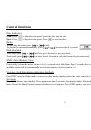
MENU/SEL control functions Press the SEL/MENU button more than 2 seconds to enter menu mode, then each press changes the mode as follows: TA mode – MASK mode – RETUNE mode DSP mode LOUD ON / OFF mode - ESP mode - MULT ON / OFF - BEEP ON / OFF - SEEK1/2 mode (only in tuner mode) - ST / MO mode (only
- Страница 11 из 54
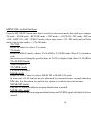
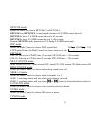
RETUNE mode Rotate the control to choose RETUNE-S or RETUNE-L RETUNE-S or RETUNE-L is time length selection of TA SEEK retune interval. RETUNE-S: short, TA SEEK retune interval is 45 seconds. RETUNE-L: long, TA SEEK retune interval is 180 seconds. Remark: RETUNE mode functions for TA during TA SEEK
- Страница 12 из 54
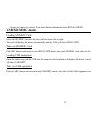
Rotate the control to choose front panel button illumination color RED or GREEN. USB/SD/MMC mode Loading SD/MMC Card Insert the SD/MMC card into the slot, with the front side at right. The unit will display the music automatically and the LCD will show MEM-CARD. Take out SD/MMC Card Push SRC button
- Страница 13 из 54
USB/SD/MMC Notes: USB functions (flash memory type) MP3 music play (1) SD/MMC card support (2) USB flash memory 2in1 (SD/MMC) support (3) Fat 12/fat16/fat32 is possible -fat 12/16 (dir: 200 support, file:500 support), -fat 32 (dir: 200 support, file:500 support) (4) Filename: 32 byte /dir name:
- Страница 14 из 54
MP3 Playback While playing MP3 disc/USB/SD/MMC-MP3 music, the folder/file name and ID3 TAG (song title, album and artist) can entirely scroll displayed on the LCD display. You can press the BAND button to see ID3 information. Elapsed playing time and Track number Folder name and number File name
- Страница 15 из 54
MP3 Overview Notes on MP3 MP3 is short for MPEG Audio Layer 3 and refers to an audio compression technology standard. This product allows playback of MP3 files on CD-ROM, CD-R or CD-RW discs. The unit can read MP3 files written in the format compliant with ISO 9660. However it does not support the
- Страница 16 из 54
Notes on creating your own CD-Rs or CD-RWs containing MP3 files To enjoy high quality sound, we recommend converting to MP3 files with a sampling frequency of 44.1 kHz and a fixed bit rate of 128 kbps. DO NOT store more than 477 MP3 files per disc. For ISO 9660 - compliant format, the maximum
- Страница 17 из 54
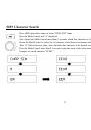
MP3 Character Search Press AMS button three times to select "CHAR SCH" mode. Press the Multi-Control and “A” displayed. Now if press the Multi-Control more than 0.5 seconds. which first character of its name is will be played. Rotate the Multi-Control to select the 1st character of the desired
- Страница 18 из 54
RDS (Radio Data System) RDS service availability varies with areas. Please understand if RDS service is not available in you area, the following service is not available, either. The following functions are available when receiving RDS stations. RDS Basics AF( Alternative Frequency list ) When
- Страница 19 из 54
Traffic Announcements Some RDS FM stations periodically provide traffic information. TP ( Traffic Program Identification ) - Broadcasting of traffic information TA ( Traffic Announcements Identification ) - Radio announcements on traffic conditions TA Mode Press TA button to turn on / off TA. When
- Страница 20 из 54
PTY Reception (Program Type) RDS FM stations provide a program type identification signal. Example: news, rock, info, sport, etc. PTY Mode Press PTY button to turn PTY on, previous PTY type is displayed and searched if no button is pressed for 2 seconds. If there is no correspond program type, NO
- Страница 21 из 54
Anti-Theft System This unit is equipped with a slide-down detachable panel. Removing this panel makes the radio totally inoperable. Removing the panel 1. 2. 3. 4. Press PWR button to switch off the power of the unit. Press button to slide down the panel. Hold the panel to pull it out. Place the
- Страница 22 из 54
Handling compact discs Dirty, scratched or warped discs may cause skip ping or noise. Handle the disc only by the edges. To keep clean do not touch its surface. Discs should be stored in their cases after use to avoid scratches. Do not expose discs to direct sunlight, high humidity, high
- Страница 23 из 54
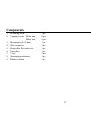
Components 1. 2. 3. 4. 5. 6. 7. 8. 9. Mounting collar Tapping screws M5x6 mm M4x6 mm Mounting bolt (50 mm) Wire connector Removable face plate case Trim plate T-key Operating instructions Rubber cushion 1 pc. 4 pcs. 4 pcs. 1 pc. 1 pc. 1 pc. 1 pc. 2 pcs. 1 pc. 1 pc. 23
- Страница 24 из 54
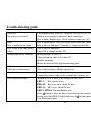
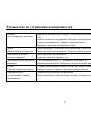
Troubleshooting guide General No power or no sound Disc Disc is inside but no sound Disc sound skips, tone quality is low Sound skips due to vibration Radio Much noise in broadcasts Preset station is reset Error display messages Car's engine switch is not on. Turn your car's key to ACC or ON. Cable
- Страница 25 из 54
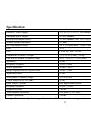
Specification General. Power supply: 12V DC (11 V-16 V), Test voltage 14.4 V, negative ground Maximum power output: Rated power output (RMS): Suitable speaker impedance: Pre-Amp output voltage: Fuse: ESP: Dimensions (WxHxD)/ Weight: FM Stereo Radio. Frequency range: Sensitivity Frequency response:
- Страница 26 из 54
! . , . ................................................................................................................................................................................... 26
- Страница 27 из 54
, . 12 . . , . , . . , , . , . , . , , , . , ( .). . , , . , , , , , . . , , . . 27
- Страница 28 из 54
/ , . , 4,75 – 5,56 , . . 1. . , ( 2. ). . . 3. . , , . . 28 ,
- Страница 29 из 54
!!! , ), ( . . 31
- Страница 30 из 54
ISO 1. ISO, 2. , ISO , . , . A 1 2 3 4 5 6 7 8 12 (+)/ / ACC+/ . B (+)--(-)--(+)--(-)--(+)--((-)--(+)--(-)--- 32
- Страница 31 из 54
33
- Страница 32 из 54
1. : , , 2 2. 3. 4,5 6. 7. 8. 9. 10. 11. 12. USB 13. . . MENU/SEL. VOL/BAS/TRE/BAL/FAD, 2 3/ . : FM1 FM2 FM3 FM(OIRT) . AF ( ). TA ( ). PTY ( ). . . SD/MMC. , iPod. . . . AM1 AM2. . 2 14. 15. 16. 17. 18. 19. 20. AMS: 3 +10 3 –10 , . . . . . (10 ). . 2 / : 3/ . 34 . .
- Страница 33 из 54
21. : . ( AUX ( 22. 23. 24. 25. 26. ). ). USB ( SD/MMC ). ( ). / . . . . . : Reset RESET : . 27. . , , . . 35
- Страница 34 из 54
: , : . , . : , . . : 0,5 : : . 0,5 0,5 . . AMS: 2 5 1–6 . 2 ,6 1 – 6. : FM1 FM2 FM3 . DISP ( DISP, . ), . . 2 . , . . 36
- Страница 35 из 54
MENU/SEL LOUD ON / OFF – ) ST / MO ( 2 , TA VOL – TA – MASK – MULT ON/OFF – BEEP ON / OFF )– LOCAL / DX ( : ESP RETUNE SEEK1/2 ( DSP ) => COLOR. TA VOL , TA. TA TA ALARM TA, . - TA SEEK. TA SEEK TA SEEK. Program – TA ALARM TP , TP (Traffic ) , , ), , PI (Program Identification – TP. , TP , , PI ,
- Страница 36 из 54
MASK , , 201 PI, MASK DPI , 100 , AF. MASK ALL. (AF), AF, , , PI CD, , 100 PI " ". , , . AF . , : MASK DPI. AF, RDS, PI ( ). MASK ALL. AF, PI 38 RDS .
- Страница 37 из 54
RETUNE RETUNE-S RETUNE-S RETUNE-S: RETUNE-L: : RETUNE-L – TA SEEK. , , RETUNE RETUNE-L. TA SEEK 45 TA SEEK 180 TA . . TA SEEK. DSP DSP=>POP=>ROCK=>CLASSIC=>FLAT=>DSP OFF LOUD . ESP ESP 12 ESP 45 : : . CD-ESP, CD-Esp, 12 45 MP3-ESP > 100 MP3-ESP > 100 . . MULT ON/OFF / ( : CD- , . : , , ). BEEP
- Страница 38 из 54
SEEK 2. , << , >>. LOCAL/DX (LOCAL) (DX) . , . ST/MO FM . COLOR RED ( 40 ) GREEN ( ):
- Страница 39 из 54
USB/SD/MMC MP3 SD/MMC SD/MMC , . MEM-CARD. SD/MMC SRC, SD/MMC, . USB , , USB USB-DRIV. . , USB SRC USB, . 41 USB
- Страница 40 из 54
USB/SD/MMC : MP3 USB ( (1) SD/MMC (2) USB 2 1 (SD/MMC) (3) Fat 12/Fat16/Fat32 -Fat 12/16 ( 200 , 500 ) -Fat 32 ( 200 , 500 ) (4) : 32 / : 32 (5) (id3tagver2.0) : 32 (6) (7) USB 1.1 USB 2.0 ( USB 2.0 USB 1.1 SD : 8M ~ 512M MMC : 16M ~ 128M ). USB 2.0 USB 1.1) . USB- : Cannon, Fujifilm, Palm,
- Страница 41 из 54
3 3 CD ) – – , USB/SD/MMC . BAND – – . ID3 TAG ( ID3 – , . 3 AMS “TRACK SCH”. , “001”. 100, , . 0,5 . 100, . . . . : , , , . 3 AMS “FILE SCH”. . . , 0,5 . , . 43
- Страница 42 из 54
. , , “ ”. 3 3 3 - MPEG 3 . 3 3, , 3, . 3, 3 , , , “ CD-ROM, CD-R CD-RW. ISO 9660. ” “ “.mp3”, MP3” “.mp3”. . “ ”, PC “ ” . 128, . 477. ( layer 3, 16/22.05/24 VBR: ( MPEG2 audio layer3 44.1 . ) MPEG , ) MPEG, 8 32/44.1/48 VBR. . 44 MPEG1 audio MPEG2 audio layer3. MPEG1 audio layer 3, 32/44.1/48
- Страница 43 из 54
CD-R CD-RW, MP3. 3 128 477 , ( , CD-R . 3 ISO 9660, ). CD-R MP3 CD-R 3 , CD-RW . 8, , . CD-RW , 3 . , 3. . CD-RW 44,1 . CD-R . 16 . , 1. , 45 1. ID3TAG. .
- Страница 44 из 54
MP3 AMS , , 0.5 «CHAR SCH» ( « ». , ). , « ». 1- , . « » . 0.5 : 2- . , . «ECHO» 46
- Страница 45 из 54
RDS ( ) RDS . , . RDS , RDS : RDS AF ( ) RDS- , , . , , . PS Display ( ) . AF 1 , AF ( AF , . REG 1 , REG. . . ( ) RDS, ). . NO CT. , 47
- Страница 46 из 54
FM- , RDS, ))- ( ( . . , . , . , 20, , 20. , SEEK ( , . ), SCAN ( ) ( EON ( AMS , ). ) EON EON, : AF: AF : . RDS- RDS. EON. EON , . , , . EON . PTY ( FM- ) , : RDS, , , , . . 48
- Страница 47 из 54
PTY: PTY, PTY. 2 PTY , . , NO PTY. PTY , 1–6, , . 1 POP M ( ) ROCK M ( 2 3 4 5 . ) EASY ( ) LIGHT M ( CLASSIC M ( OTHER M ( ) ) ) JAZZ M ( COUNTRY M ( ) ) NATIONAL M ( OLDIES M ( ) ) NEWS ( ) AFFAIRS ( INFO ( ) SPORT ( ) EDUCATE ( DRAMA ( ) CULTURE ( ) SCIENCE ( ) VARIED ( ) WEATHER ( ) FINANCE ( )
- Страница 48 из 54
. , . 1. 2. 3. 4. POWER , 0,5 . . . , 1. . , , . 2. , . . 1. 2. 3. . , . 50 .
- Страница 49 из 54
, . , . , , . , . ( , ). . , , . , . , . CD CD , 3 3 (8 , ). , . 51 CD .
- Страница 50 из 54
. ( , ), , . ) . , , , . ) , . , . . 6 6 (50 – ) 1 4 4 1 1 1 1 2 1 1 . . . . . . . . . . 52
- Страница 51 из 54
. ACC ON. . . . . , . . , , . . . , . . . 30 , . . . 30 . , . . . , . 53 .
- Страница 52 из 54
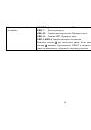
NO FILE: ERR-7: ERR-10: ERR-11: ERR-3: ERR-4: CD 3. . . 3. . . . . , RESET , . . 54
- Страница 53 из 54
12 , : (RMS): : ESP: )/ FM . – 16 ) 14,4 , 50 4 25 4 (4 10 % 4–8 2.0 ( 15 CD 40 , MP3 120 178 50 166 / 1.64 65.0-74.0 / 87.5-108.0 : ( (11 : : . .D.) CD: 1 ,0 , 10 ) 10 / : 30 – 15 50 70 / 55 522-1620 30 : IF/ AM : . : = 20 . ): / 30 (1 ) : : / : / : 20 - 20 > 86 / > 60 0.2 % (1 )/ . . 55
- Страница 54 из 54